

Making Tax Digital VAT: 2026 Compliance Guide
Action Accountants •8 June 2026
You open a letter from HMRC, or your bookkeeping software starts flagging an MTD warning, and the same thought hits most business owners straight away: I'm already filing VAT, so what exactly has changed? If you're in construction, property, consulting, or running a growing limited company, the confusion is usually the same. You're not worried about the concept of VAT. You're worried about whether your records, spreadsheets, invoices, and filing process are set up in a way HMRC will accept.
That's where making tax digital VAT catches people out. It sounds like an online filing change. In practice, it's a record-keeping and systems rule. The businesses that struggle aren't always disorganised. Often, they're doing what worked for years: using spreadsheets, moving figures manually, checking totals near the quarter end, and submitting once everything “looks right”.
That approach is exactly what now causes problems. The good news is that MTD for VAT is manageable when you translate HMRC language into normal business processes. Once the records, links, and software are set up properly, VAT filing usually becomes more routine and less stressful.
Table of Contents
- The End of Paper VAT Returns Is Here
- Understanding Making Tax Digital for VAT
- Digital Records and Compatible Software Explained
- Your Step-by-Step MTD Compliance Checklist
- Guidance for Special VAT Scenarios
- Common MTD Pitfalls and How to Avoid Them
- Get MTD Right with Action Accountants
The End of Paper VAT Returns Is Here
A familiar version of this happens every week. A contractor has always kept decent records. Sales invoices are raised on one system, supplier bills sit in email folders, and the VAT return is built in a spreadsheet before someone types the figures into software at the end. Nothing feels reckless about it. It feels practical.
Then HMRC's MTD rules enter the picture and that old process stops being safe.
The change matters because making tax digital VAT isn't really about replacing paper with a screen. It's about how VAT data moves from the first transaction to the submitted return. If that journey depends on manual copying, retyping, or disconnected files, the business has a compliance problem even if the final VAT figures are technically correct.
Why business owners feel stuck
Most owners don't need another definition of VAT. They need answers to operational questions:
- Can I still use spreadsheets?
- What if I'm on the Flat Rate Scheme?
- What records does HMRC expect me to keep digitally?
- What happens if my bookkeeper uses one tool and my accountant uses another?
- How do landlords or contractors deal with this without rebuilding everything from scratch?
Those are the right questions. The friction usually sits in the workflow, not the tax maths.
Practical rule: If your VAT process depends on someone manually moving figures from one place to another before filing, it needs checking.
What works in the real world
The businesses that settle into MTD fastest usually do three things well:
- They accurately map the current process. They identify where invoices start, where VAT coding happens, and where adjustments are made.
- They simplify the handoffs. Fewer disconnected systems usually means fewer filing risks.
- They treat VAT records as an ongoing process. Not a quarter-end scramble.
If you're feeling uncertain, that's normal. HMRC jargon makes straightforward issues sound technical. Once you break the process into records, links, software, and filing, it becomes much easier to fix.
Understanding Making Tax Digital for VAT
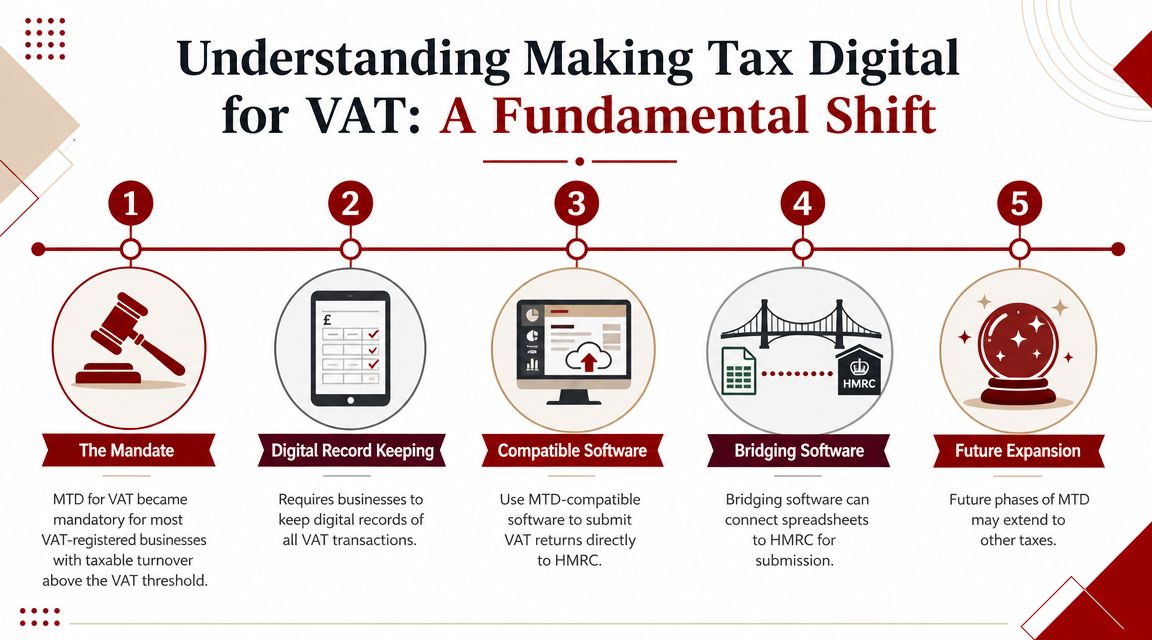
Making Tax Digital for VAT became mandatory in the UK on 1 April 2019 for VAT-registered businesses with taxable turnover above £85,000, and it was extended to all VAT-registered businesses from April 2022, according to HMRC's final evaluation of Making Tax Digital for VAT. The same HMRC evaluation reports that around 60% of businesses found their first MTD submission easy, rising to over 70% for ongoing submissions, which tells you something important. The first setup is where most of the effort sits.
What MTD for VAT actually changes
The biggest misunderstanding is thinking MTD is just a new place to file the same return. It isn't. HMRC wants VAT information to be kept digitally and sent through compatible software rather than built manually at the end of the quarter.
That shifts the focus from submission day to day-to-day bookkeeping. If the records are weak, the filing will be weak. If the records are clean and connected, the filing becomes much easier.
Who needs to care
If you're VAT-registered, this applies to you unless you have a valid exemption. For most businesses reading this, the practical question isn't whether you're in scope. It's whether your current process is compliant.
That includes businesses that:
- Voluntarily registered for VAT
- Use spreadsheets as their main bookkeeping tool
- Rely on an external bookkeeper or accountant
- Operate under a special VAT scheme
- Have more than one source of income or more than one software platform
A lot of businesses think they're compliant because they submit online. HMRC's focus is wider than that. The records and the digital journey matter just as much as the filing itself.
Why HMRC pushed this change
HMRC's stated direction is clear: digitised tax administration, fewer avoidable errors, and a more consistent reporting process. Whether or not a business likes the policy, it's not a temporary pilot anymore. It's built into the way VAT compliance now operates.
For most owners, that means one sensible adjustment in mindset. Stop treating MTD as an annual or quarterly admin task. Treat it as part of the finance system. Once you do that, the jargon starts to fall away and the practical fixes become obvious.
Digital Records and Compatible Software Explained
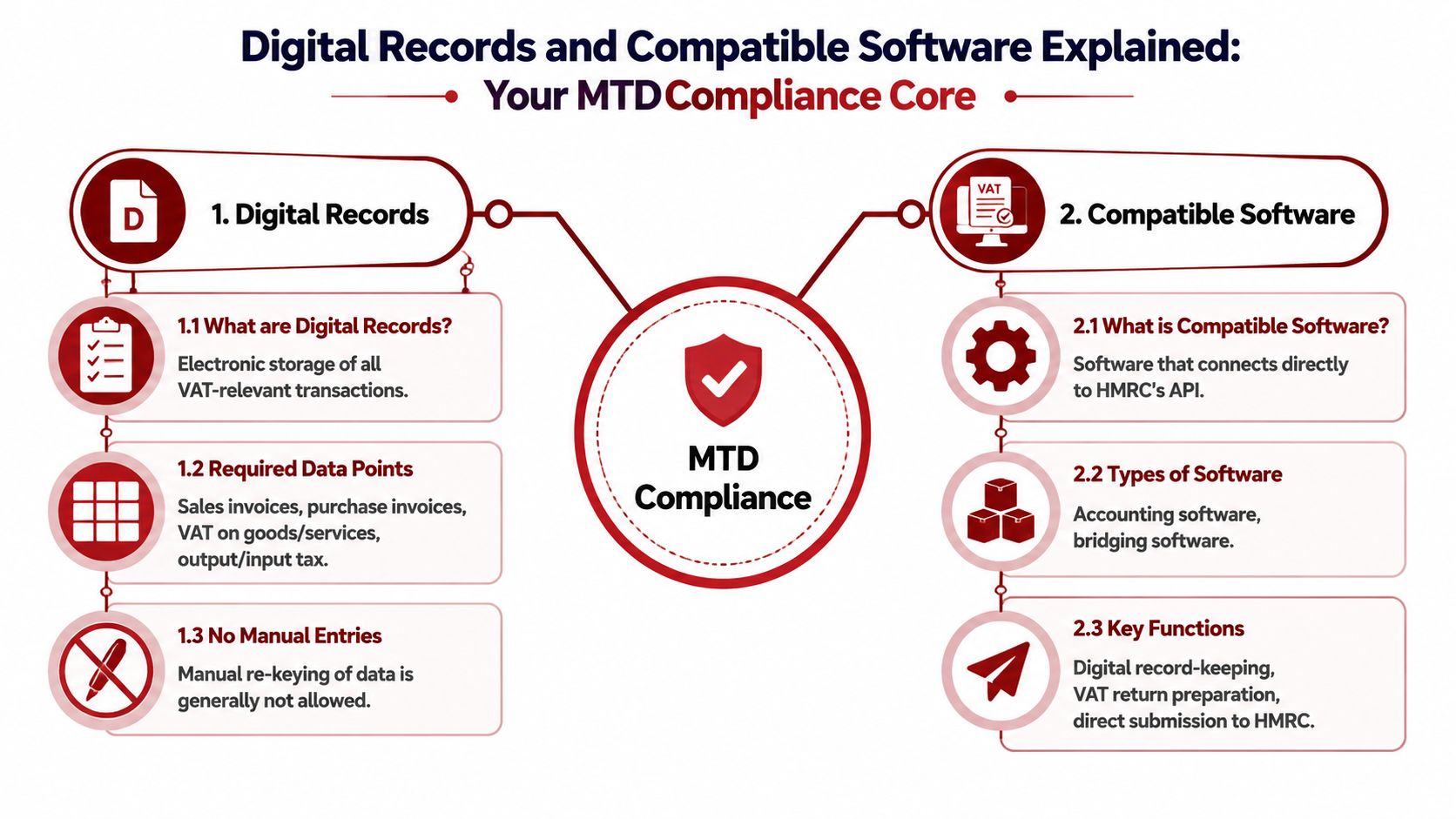
HMRC requires VAT-registered businesses to keep digital records and submit VAT returns through functional compatible software, with a digital audit trail from source records to return boxes, as set out in VAT Notice 700/22 on Making Tax Digital for VAT. A spreadsheet can still be part of the setup, but only if it is digitally linked to compliant software rather than updated by manual copy and paste.
What counts as a digital record
Think of your VAT records as the raw ingredients for the return. HMRC expects the core VAT information to exist in digital form and to stay in digital form through to submission.
In practice, that means your system should retain the VAT totals needed to support the return, including:
- Output tax on sales
- Input tax on purchases
- Reverse-charge tax where relevant
- Error-adjustment totals where an adjustment is needed
The point isn't just storage. The point is traceability. If a figure lands in a VAT return box, there should be a clear digital path back to the records that created it.
What compatible software means in plain English
Compatible software is software that can communicate with HMRC through its API and handle the MTD submission process properly. That could be a full bookkeeping platform, or it could be bridging software sitting on top of spreadsheets.
Here's the easiest way to think about it. Your VAT process is a chain. If data starts in invoices, moves into bookkeeping records, flows into the VAT calculation, and ends in the submitted return, every link in that chain has to hold. Manual retyping breaks the chain.
A good system usually falls into one of these categories:
| Setup | Best for | Main caution |
|---|---|---|
| Integrated accounting software | Businesses wanting one system for bookkeeping and VAT | Needs proper setup and VAT coding discipline |
| Spreadsheet plus bridging software | Businesses with established spreadsheet models | Digital links must be genuine, not manual workarounds |
| Multi-app finance stack | Businesses with sector-specific tools | App connections and export flows need checking carefully |
If you're comparing platforms, this guide to cloud tax software is a useful starting point because it frames the software decision around workflow and integrations, not just branding.
Where businesses usually go wrong
The biggest issue isn't always the software itself. It's the gap between systems. A sales spreadsheet, a separate purchase ledger, emailed adjustments, then one final workbook used for filing can create hidden compliance weak spots.
That's especially common for sole traders and smaller businesses that began with simple records and then grew into VAT without redesigning the process. If that sounds familiar, tightening the bookkeeping side first often makes the MTD side far easier. A practical example is having a cleaner purchase and sales workflow before quarter end, which is why many business owners revisit their bookkeeping setup for sole traders before changing software.
If you can't explain how a sales invoice becomes a VAT return figure without mentioning copy and paste, your setup probably needs work.
Your Step-by-Step MTD Compliance Checklist
The safest way to handle making tax digital VAT is to treat it as a checklist, not a technical puzzle. Most filing problems come from missed setup steps, poor timing, or software that was never connected properly in the first place.
Start with the process below and work through it in order.
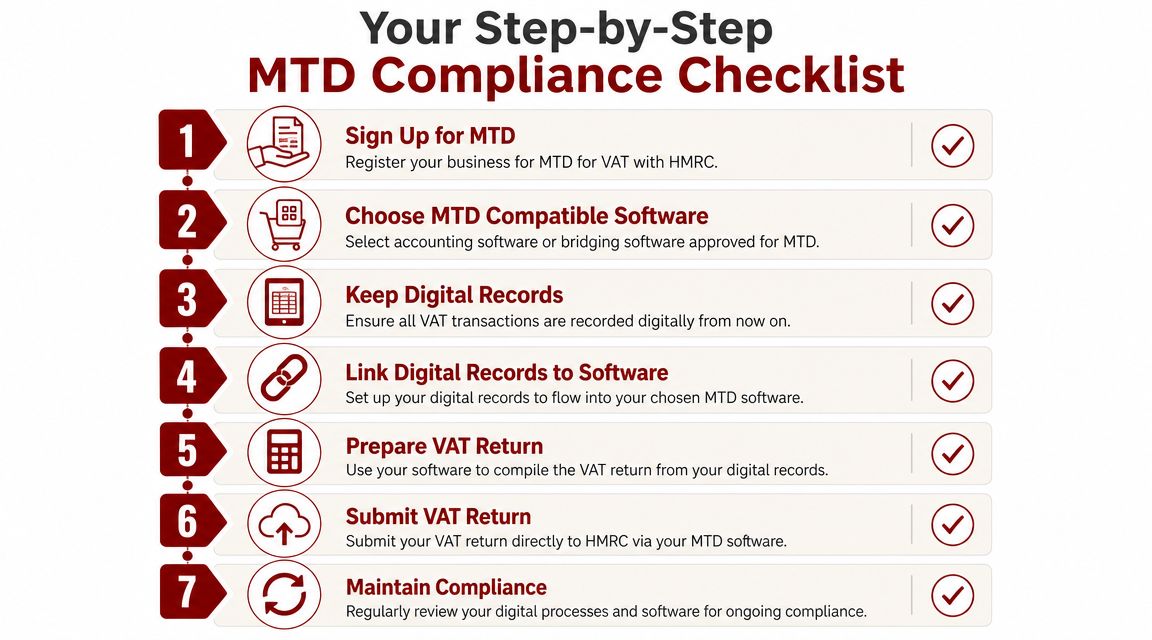
Register for MTD at the right time
Don't leave sign-up until the day you want to file. Registration affects how your VAT submissions are handled, and rushed sign-ups create avoidable confusion.
Before you begin, gather:
- Government Gateway login details
- VAT registration number
- Business contact details
- Banking and direct debit awareness, if someone else in the business manages payments
Wait for HMRC confirmation before assuming everything is live. Filing too early through the wrong route, or assuming the software is already authorised, is a common way to create delays.
Choose software that fits your workflow
The right tool depends on how your business operates, not what a software advert says. A consultant with straightforward sales and limited purchase volume may want simplicity. A contractor with subcontractor costs, supplier invoices, and multiple adjustments may need stronger controls.
Check these points before committing:
- Can it handle your VAT scheme properly?
- Can it import or connect to your existing records without manual workarounds?
- Can your accountant or bookkeeper review the VAT return easily?
- Does it support the reports you use to check figures?
If you're self-employed and reviewing your wider records at the same time, it also helps to make sure expenses are being captured consistently. That work often overlaps with VAT cleanup, especially where claims are mixed or inconsistently coded. This guide to tax-deductible expenses for the self-employed is a useful companion piece when tightening the books.
A short visual walkthrough can help if you want to see the filing flow before changing your process.
Connect the software properly
Once you've chosen the software, authorise it with HMRC and test the full route from records to draft return. Don't stop at “it's connected”. Check that the VAT periods are showing correctly, prior returns are visible where appropriate, and the box totals make sense.
This is also the point to review who does what:
- Who enters purchase invoices
- Who reviews VAT coding
- Who posts adjustments
- Who submits the return
That clarity matters. MTD failures often come from a handoff problem, not a tax problem.
File the first return carefully
Your first MTD return deserves a slower review than later ones. Reconcile the sales total, purchase total, and VAT control position before submission. If the software allows notes or supporting schedules for internal use, keep them tidy.
Key check: The first compliant return should prove that your process works end to end, not just that the submission button works.
After the first filing, the routine usually gets easier. The main win is consistency. Once the bookkeeping, VAT coding, and submission flow settle down, quarter ends become much less disruptive.
Guidance for Special VAT Scenarios
General MTD advice is fine for straightforward trading businesses. The trouble starts when a business sits inside a sector rule, special VAT scheme, or mixed transaction pattern. That's where routine bookkeeping choices can produce awkward VAT errors.
Contractors and subcontractors
Construction businesses often trip over VAT because the ledger contains a mix of materials, labour, subcontractor bills, retention issues, and occasional reverse-charge treatment. Under MTD, the bookkeeping has to reflect those distinctions cleanly before the return is built.
If you're in construction, two habits matter more than anything else:
- Separate coding disciplines for different transaction types
- Regular review of supplier invoices before quarter end
A rushed quarter-end adjustment in a spreadsheet is exactly the kind of workaround that causes trouble later. For contractors, the cleanest method is usually to code transactions correctly as they enter the system, then review exceptions rather than rebuild the VAT return from scratch.
Flat Rate Scheme users
Businesses on the Flat Rate Scheme often assume MTD is simpler for them because the calculation method is simpler. Sometimes it is. But only if the software is configured for the scheme correctly.
The common issue is that software is left on a standard VAT setup while the business believes it is operating on flat rate logic. That mismatch affects reports and review routines, even if the submitted number is eventually corrected.
The answer is practical. Make sure the scheme setting, the effective date, and the treatment of purchases are all checked at setup. Then test a draft return before the filing deadline.
Annual Accounting Scheme businesses
Annual Accounting Scheme users need a bit more discipline around timing. Because the return cycle feels less frequent, bookkeeping errors can sit in the records for longer before anyone spots them.
That makes monthly housekeeping more important, not less. Reconcile bank feeds, review sales and purchases, and clear suspense items as you go. If the records stay untouched until the filing point, MTD becomes much harder than it needs to be.
Businesses on longer VAT cycles often don't have a filing problem. They have a backlog problem.
Landlords and property investors
Property businesses can be deceptively complex. A landlord with one commercial unit and one residential property may have a very different VAT position across those activities. Developers and investors can have even more moving parts, especially where refurbishment, professional fees, and mixed-use costs are involved.
The practical issue under MTD is record design. If property income and property costs are lumped together without enough detail, the VAT review becomes messy very quickly. Separate income streams, separate cost categories, and clear digital support for adjustments save a lot of time later.
If you're dealing with property transactions, refurbishments, or input VAT questions, it helps to review the wider reclaim position alongside the MTD setup. This guide on how to claim VAT back is useful when checking whether the records behind a claim are strong enough to support it.
Common MTD Pitfalls and How to Avoid Them
HMRC's policy analysis, as discussed in Tax Adviser's review of Making Tax Digital for VAT, put the implementation burden at around £131 million in one-time transition costs across a mandated population of 1.2 million businesses, plus about £37 million per year in net ongoing costs. That matters because it confirms what practitioners see in real life. The cost sits less in VAT arithmetic and more in changing systems, software, and working habits.
The spreadsheet trap
Spreadsheets aren't the enemy. Weak spreadsheet processes are.
A business can still use spreadsheets in an MTD environment, but the moment someone starts pulling figures from tabs, emails, or exported reports and then manually assembling the return, control weakens. Errors creep in. Adjustments become hard to trace. Reviews take longer because nobody can see the digital path cleanly.
The remedy is simple in principle. Either build a genuine digital-link process with bridging software, or move the VAT workflow into a more integrated accounting platform.
Poor software choice
Some businesses buy software that is technically compliant but operationally wrong for the business. It files VAT, but it doesn't handle the actual workflow. That leads to manual detours, duplicate records, and quarter-end cleanup.
Watch for these warning signs:
- Too many off-system adjustments
- Reports that don't match how the business trades
- Users avoiding the software and keeping side records elsewhere
- Repeated confusion over VAT coding
Good software reduces friction. Bad software pushes essential work into spreadsheets and inboxes.
Weak bookkeeping before filing
MTD doesn't fix poor records. It exposes them.
If bank transactions are unreconciled, purchase invoices are missing, or VAT codes are applied inconsistently, the return becomes a guess dressed up as a report. The compliance risk isn't just the submission. It's the correction work afterwards.
A better pattern is to run a short review before every VAT period closes:
| Check | Why it matters |
|---|---|
| Sales ledger review | Confirms output tax is complete and coded properly |
| Purchase ledger review | Catches missing invoices and input tax errors |
| VAT code scan | Spots inconsistent treatment before filing |
| Adjustment log review | Ensures changes are deliberate and supported |
Archive problems
Businesses often focus on filing and forget retention. Under HMRC's rules, records need to remain available for the required retention period, including after deregistration. If a business changes software without planning the archive, old VAT evidence can become hard to retrieve.
That's a real operational risk. When businesses migrate systems, they should decide in advance how historic VAT records, returns, reports, and supporting schedules will be preserved.
The safest MTD setup isn't the one with the most features. It's the one your team can follow consistently, review clearly, and retrieve records from when needed.
Get MTD Right with Action Accountants
If you're facing MTD issues, they usually fall into one of three buckets. The records are messy, the software doesn't fit the business, or the VAT treatment is more specialised than it first appeared. That's why making tax digital VAT feels straightforward for some firms and frustrating for others.

The businesses that benefit most from professional support are usually the ones with moving parts: contractors handling sector-specific VAT issues, landlords with mixed activities, founders using several systems, and owners who do not want quarter-end compliance to swallow their time. In those situations, the right help isn't about pressing submit for you. It's about tightening the whole process so the return is based on reliable records.
Good MTD support also overlaps with document control. VAT compliance depends on being able to retrieve invoices, adjustments, and supporting records without scrambling through email chains. If you're reviewing your finance workflow more broadly, this document management guide for accountants is a useful read because it highlights the operational side of keeping finance evidence organised.
For businesses in London and across the UK, it helps to work with a firm that understands both compliance and day-to-day operations. If you want a sense of the wider service approach behind that kind of support, see this overview of a trusted accountancy practice in London.
The right setup should leave you with fewer last-minute adjustments, cleaner records, and more confidence each time a VAT period closes.
If you want practical help with Making Tax Digital for VAT, Action Accountants Limited can help you review your current process, fix weak digital links, choose suitable software, and keep your VAT records compliant without turning quarter end into a panic.