
Accounting Software Integration: A Practical UK Guide
Action Accountants •28 July 2026
You know the pattern already. The sales team closes a job, the bank feed is half-working, payroll lives in one system, VAT gets rebuilt in a spreadsheet, and someone in finance spends Friday afternoon re-keying invoices that were already entered somewhere else. That's not a process, it's a leak.
Accounting software integration stops that bleed by moving financial data between your systems automatically, so your ledger, payroll, banking, CRM, and VAT workflow all speak the same language. In the UK, that matters more than convenience. HMRC's Making Tax Digital rollout made digital record-keeping and compatible software part of the compliance environment for VAT-registered businesses above the threshold, and HMRC said more than 1.1 million businesses were already eligible at launch, with over 1 million businesses signed up by April 2021, according to the integrated accounting software market overview from Fortune Business Insights. In a country where the business base is overwhelmingly SME-led, integration is no longer a luxury layer on top of bookkeeping. It's the plumbing.

A decent integration behaves like a tireless data clerk. It posts the right transaction to the right account, applies the right tax code, and keeps doing it without asking for a coffee break. If you want a practical baseline for the accounting side of this, the guide on how to do small business accounting is a solid companion read, and company insights from Amax IT is useful if you want a more technical view of how businesses think about connected systems.
The broader economics also explain why this keeps rising up the priority list. The Office for National Statistics reported UK market sector productivity grew by only 0.5% per year on average between 2009 and 2019, which is one reason firms keep pushing manual finance work into software as reflected in the automation statistics overview. The British Business Bank also reported that 99.8% of UK businesses were SMEs, accounting for 60% of employment and 48% of turnover in the same overview. That makes integration a mainstream operating issue, not an enterprise-only project.
Table of Contents
- Why Accounting Software Integration Matters for UK Businesses
- Comparing Native Connectors, Middleware, and Custom API Approaches
- Common Integration Types and Real-World Use Cases
- UK Compliance Edge Cases That Most Guides Overlook
- Your Step-by-Step Integration Implementation Checklist
- Security, Data Protection, and Cost Considerations
- How Action Accountants Supports Your Integration Journey
Why Accounting Software Integration Matters for UK Businesses
A growing business usually doesn't fail because it lacks software. It fails because the software doesn't talk to itself. I've seen owners spend hours each week pulling orders from Shopify, re-entering them into Xero or Sage, copying payroll figures into VAT worksheets, then checking bank lines one by one because nobody trusts the numbers until they've been touched three times.
That's exactly where accounting software integration pays for itself. It connects the systems that create financial facts, sales channels, payroll tools, bank feeds, receipt capture apps, and the accounting platform that should hold the ledger. Instead of manual re-keying, data moves automatically and lands where it belongs.
What integration actually does
Think of integration as a discipline, not a gadget. Operational systems remain the source of events, an order was placed, a shift was worked, a subcontractor invoice came in, while the accounting platform remains the source of truth for the ledger. That split matters because it turns messy activity into auditable journal entries, which is the difference between tidy operations and broken books as described in the integration best-practice guidance.
Practical rule: if a business event can be generated in one system and posted to the ledger without a human copying it, you should automate it.
The UK made that shift unavoidable. HMRC's Making Tax Digital for VAT framework requires digital records and functional-compatible software for the businesses it covers, and HMRC said the rollout hit a very large share of SMEs from day one because the VAT registration threshold remained £85,000 in the integrated accounting software market overview. That means integration is not just about saving time, it's about reducing the chances of VAT data drifting between systems before a return is filed.
Why the daily workflow changes
The best integrations remove friction in small, repeatable places. Bank transactions flow in automatically. Payroll journals post on schedule. Invoice data carries the right tax treatment into the ledger without someone reclassifying it later. That's where the time saving comes from, but the deeper benefit is control. You stop relying on memory, email attachments, and “we'll fix it at month end”.
If you run a UK SME, that matters more than most vendors admit. Weak productivity growth across the UK economy has kept pressure on back-office efficiency as reflected by the ONS figure, and software integration is one of the few levers finance teams can pull without hiring more admin staff. In plain English, it gives you cleaner books, faster closes, and fewer ugly surprises when the VAT return lands.
Comparing Native Connectors, Middleware, and Custom API Approaches
Most businesses get stuck because they compare tools, not architectures. That's the wrong lens. You're not choosing between “simple” and “advanced”, you're choosing where the complexity sits, inside the accounting platform, in a middleware layer, or in code you own.
Native connectors versus middleware versus custom build
Native connectors are the easiest place to start. They're built into platforms like Xero, QuickBooks, or Sage, and they work well when your processes are standard. The catch is obvious once your business becomes less standard. Field mapping is limited, edge cases are awkward, and you usually have to accept the vendor's idea of how data should move.
Middleware sits in the middle and translates data between systems using pre-built connectors and rules. That gives you more flexibility than a native plug-in, especially if you need to bridge several apps, but you pay for it in subscription cost and another layer to troubleshoot. If something breaks, your team now has to ask whether the accounting system is wrong, the source system is wrong, or the middleware translation is wrong.
Custom API work gives you maximum control. It's the right answer when you need unusual posting logic, specific validation rules, or very tight control over accounting behaviour. It's also the most demanding route because somebody has to maintain authentication, error handling, retries, field mapping, and version changes over time which is why reliable integrations need idempotency, deduplication, and observability.
A simple decision table
| Criteria | Native Connectors | Middleware | Custom API |
|---|---|---|---|
| Setup speed | Fast | Fast to moderate | Slowest |
| Control over accounting logic | Low | Medium | High |
| Best for standard workflows | Yes | Yes | Sometimes |
| Best for edge cases and custom rules | Weak | Moderate | Strong |
| Ongoing maintenance | Low on day one, messy later | Ongoing subscription and oversight | Highest internal effort |
| Fit for small UK SMEs | Often enough | Good when several apps need to talk | Usually excessive unless the process is unusual |
My rule of thumb: if your workflow is ordinary, don't build custom code just to feel clever. If your workflow has UK-specific tax complexity or cross-system approval logic, don't rely on a connector that was designed for generic users.
Which model fits which business
A small services firm with one bank, one payroll system, and one accounting platform can usually live with native connections. A growing e-commerce business with multiple sales channels and inventory needs often lands in middleware territory. A construction firm with CIS controls, or a property business with multi-source reporting and tax nuance, often needs something closer to custom logic, even if the front end still looks simple.
The right choice is not the fanciest one. It's the one that keeps the ledger accurate without creating a maintenance monster. If the integration makes your team nervous every time a software vendor updates a field, it's already too fragile.
Common Integration Types and Real-World Use Cases
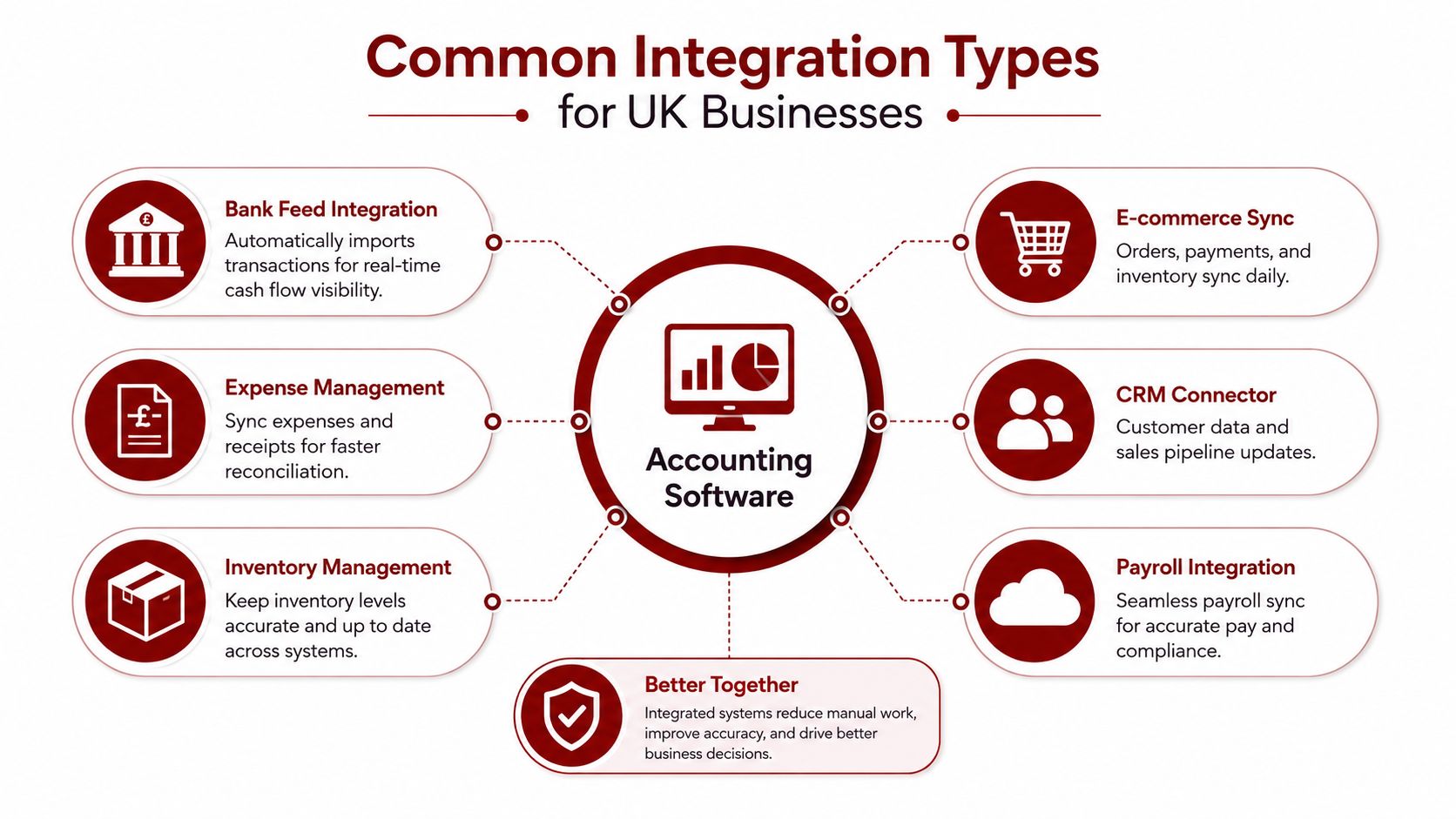
The best integrations do two jobs at once. They cut manual work, and they keep the ledger honest. For UK businesses, the strongest returns usually come from connections that move money in, money out, and tax treatment without extra rekeying.
Bank feeds and payroll first
Bank feed integration is usually the first connection to get right. It pulls transactions directly from business bank accounts, so you are not uploading statements by hand or reconciling from paper exports. Done properly, it gives the finance team a current view of cash movement. Done badly, it creates duplicate entries and a pile of unmatched lines.
Payroll integration should sit close behind it. Salary journals, pension contributions, and PAYE information need to flow into the accounting system on each pay cycle. If staff have to retype those figures, mispostings follow quickly. If you want the accounting language behind the structure of those postings, what a nominal ledger is explains why account mapping matters so much.
Sales, stock, time, and property
CRM integration keeps deals, customers, and invoice status aligned, so the sales pipeline and the ledger tell the same story. That matters when sales teams need to see what has been sold versus what has been invoiced. E-commerce integration is more demanding. Orders, payments, and stock movements from platforms like Shopify or Amazon need to sync into sales and inventory records, or the finance team ends up clearing a backlog of mismatched orders and tax lines.
Time tracking integration matters for service businesses. Billable hours need to flow into invoicing without manual rebuilding from timesheets, otherwise staff spend time correcting invoices that should have been generated properly in the first place. Property and landlord integration works differently. Rental income, maintenance costs, and tenant records need to land in the right property-specific accounts, or tax reporting turns into spreadsheet work instead of controlled bookkeeping.
Where integrations break
The failures are usually ordinary, and that makes them expensive. A payroll connector maps gross pay but misses pension setup. An e-commerce sync posts sales without the right tax code. A CRM integration creates the invoice but not the customer record, so the ledger fills up with duplicates.
If an integration cannot preserve account mapping and tax logic, it is not automating finance. It is moving mistakes faster.
Use bank feeds and payroll as the base. Then pick the channel that creates the most manual re-entry in your business. An e-commerce retailer should fix stock and VAT posting before polishing CRM sync. A contractor should get payroll and CIS data right before spending time on sales pipeline automation.
UK Compliance Edge Cases That Most Guides Overlook
Most integration guides focus heavily on field mapping. That overlooks the primary issue. UK tax logic is where integrations fail, and once you start handling VAT treatment, reverse charge, partial exemption, or CIS, weak mapping can push bad entries into the ledger before anyone spots them.
VAT logic has to survive the handoff
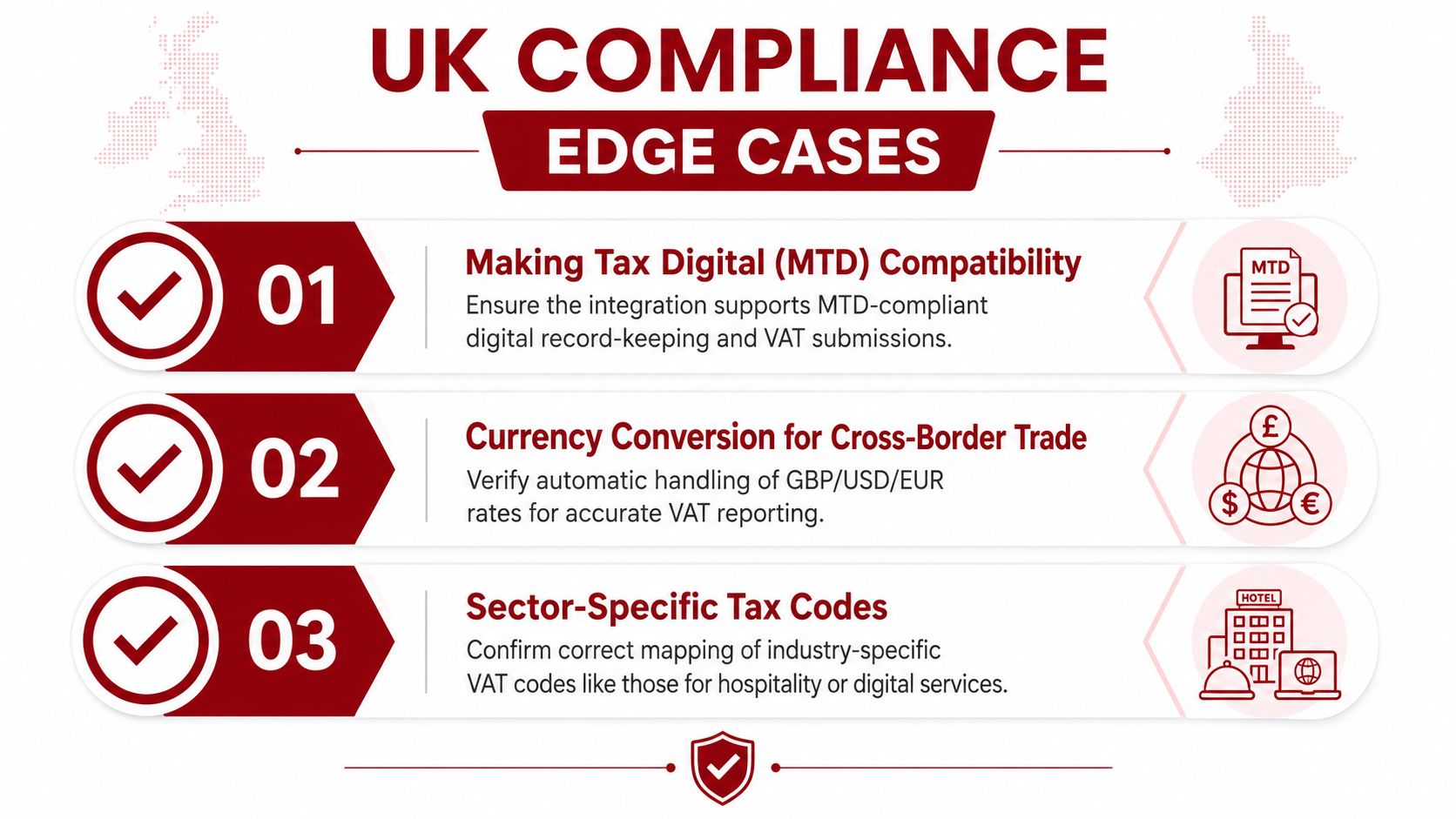
HMRC's VAT framework distinguishes standard-rated, reduced, zero-rated, exempt, and outside the scope transactions, and that distinction has to survive the trip from source system to ledger as covered in the VAT integration guidance. If your integration only understands “taxable” and “non-taxable”, it is too blunt for UK use. The record needs the correct tax code, the correct account mapping, and enough context to stand up in review later.
Making Tax Digital VAT compliance guidance is the right reference point here, because digital record-keeping and compatible software make integration quality a direct VAT control, not just an operational convenience see the MTD VAT compliance guide. If the tax code is wrong at connection time, that wrong code can keep flowing every time the connector refreshes.
Partial exemption and reverse charge need deliberate handling
Partial exemption is where generic connectors usually break. Mixed supplies need careful treatment because not every line on an invoice follows the same VAT logic. Reverse charge adds another layer, especially for services received from overseas suppliers, where the accounting treatment has to post correctly or the VAT return can become misleading.
The fix is disciplined validation. Validate tax-rate and account-mapping data at connection time and after refreshes, and make sure outbound transactions are checked against available dimensions, account categories, feature flags, and tax rates before they post which is the recommended pattern for UK accounting integrations.
CIS is a separate workflow, not just a tax code
Construction Industry Scheme integration needs its own controls. Contractors must verify subcontractors, apply the correct deduction rate, and produce monthly returns. If payroll, invoicing, and compliance controls are out of sync, the bookkeeping layer can look tidy while the statutory process is already broken as highlighted in the CIS integration coverage.
A useful checklist before go-live is straightforward.
- Test mixed VAT supplies: Check standard, reduced, zero-rated, exempt, and outside-the-scope items separately.
- Validate reverse charge postings: Confirm overseas supplier invoices create the right ledger treatment.
- Review correction handling: Make sure credit notes and amended invoices do not duplicate tax.
- Check CIS verification flow: Confirm contractor and subcontractor data syncs before deduction statements are produced.
- Inspect refresh behaviour: Re-run mappings after any connector refresh, not just at initial setup.
If your integration vendor cannot explain how it handles those cases, it is not suitable for a UK finance stack. That is not harsh. It is how compliance works.
Your Step-by-Step Integration Implementation Checklist
A lot of integration projects fail before the software is even switched on. The team starts with a connector demo, skips the audit, and then wonders why the chart of accounts doesn't line up or the payroll export doesn't reconcile. Don't do that.
Audit before you connect anything
Start by listing every system that touches financial data. That includes the accounting platform, bank feeds, payroll, invoicing, CRM, e-commerce, expense capture, and any spreadsheets that still act like systems. Then document the current manual workflow for each flow of data, because that's the baseline you're trying to replace.
Non-negotiable: if nobody can explain where a number comes from today, no integration project will save you.
Choose the connector with the right failure handling
Vendor selection should focus on reliability, not brochure language. Ask how the connector handles retries, duplicate prevention, connection refreshes, and error visibility. If a provider can't show you how they manage idempotency and observability, expect awkward surprises later those are core requirements for production-grade accounting integrations.
Map the data before you test live
Configuration is where many teams get lazy. Align the chart of accounts, standardise master data fields, and map tax codes with real UK logic rather than broad labels. Then check whether your connected platform supports the tax and account dimensions you need, not just the ones in the demo the validation approach described in the standardisation guidance is the right model here.
Run parallel processing before go-live
Test in a sandbox first, then run parallel processing for at least one full reporting period. Credit notes, refunds, multi-currency transactions, and VAT edge cases need to be checked against expected outputs. If the system can't post cleanly in parallel, it won't be clean in production.
Cut over with rollback in mind
Go-live should happen when both your finance team and your IT support understand the cutover plan. Pick a low-risk period, define who watches the first syncs, and keep a rollback option open until the new workflow has survived real-world data. The first month matters more than the launch day, so monitor errors daily and fix mapping problems fast.
- Audit the flows: Identify all sources and destinations of financial data.
- Select the vendor: Test reliability, error handling, and support response.
- Configure carefully: Align accounts, tax rules, and master data.
- Test in parallel: Validate live-like scenarios before switching over.
- Monitor after launch: Watch for duplicate entries, missing fields, and failed refreshes.
If you follow that sequence, you'll avoid the most common disaster, launching with a connector that looks fine in demo data and fails on real UK transactions.
Security, Data Protection, and Cost Considerations
Security and cost are the two questions owners ask first, and they should. If integration exposes finance data to the wrong people, or if the spend outweighs the time saved, the project is a bad fit. I have seen teams rush into a connector because the demo looked tidy, then spend months cleaning up the mess when permissions, mapping, and audit trails were not set properly.
Security has to be boring and provable
Look for encryption in transit and at rest, OAuth-based authentication, and a least-privilege approach to API access. If a vendor cannot explain how tokens are stored, refreshed, and revoked, they are not ready to handle financial data. You also need to know whether the provider stores customer data or passes it through, because that changes your data protection and residency discussion the proxy versus caching distinction matters in accounting integration architecture.
GDPR still applies when finance data moves between processors, so the vendor's security documentation should be clear, specific, and current. If you are reviewing wider business risk as well, a dark web scan guide is a useful extra check, but it does not replace a proper review of the integration provider's controls.
Costs are wider than the subscription fee
Integration cost is not just software licensing. It includes implementation time, internal support, ongoing maintenance, and the cost of errors when a VAT return, payroll posting, or bank reconciliation goes wrong. That is why I prefer a simple ownership model over a polished sales quote.
For a small team, compare the hours saved from manual entry against the annual cost of the connector stack. For a larger team, include the value of a cleaner month-end close, fewer corrections, and less time spent tracing errors across systems. A 10-person business and a 50-person business will usually justify integration in different ways, but both should measure the same thing, hours avoided and mistakes prevented.
Build the case using actual workflow pain
If your finance team spends half a day every week on re-entry, that is already a cost. If your operations team keeps sending unposted invoices back to finance, that is another. Put those tasks into a simple model, then compare them with the cost of the integration platform, middleware, and implementation help. If the software saves time but creates more review work, it is the wrong setup.
UK tax coding is where weak integrations show their real cost. Partial exemption VAT, reverse charge treatment, and CIS deduction flows all depend on clean mappings, and poor data handling turns a technical issue into a compliance problem. If corporate card coding and expense categories still sit outside the finance stack, streamline corporate spending before you expect the rest of the system to behave.
The best integrations disappear into the background after launch. The worst ones create a new admin burden called integration management. Do not pay for the second one.
How Action Accountants Supports Your Integration Journey
The accounting side of integration succeeds when someone understands both the software and the compliance outcome. That's where a firm like Action Accountants Limited fits naturally. For London and North West London businesses, especially startups, SMEs, contractors, and landlords, the value is having a team that can look at bookkeeping, payroll, VAT, CIS, and cloud setup as one connected system rather than separate jobs.
Their cloud accounting services are relevant here because integration only works when the finance stack is designed properly from the start. That matters for construction clients in particular, where CIS-aware workflows and payroll treatment have to be aligned with bookkeeping and reporting, not patched together later. It also matters for owners who need someone to spot where a connector is technically “working” but still posting the wrong thing to the wrong ledger account.
If you want a practical partner, not a vendor salesperson, the right conversation is simple. What systems are you using now, what data is moving manually, and where are the compliance risks if that data lands in the wrong place? That's the kind of review that prevents messy month-ends before they start, especially for businesses in Colindale, Kingsbury, Queensbury, Edgware, Finchley, and the wider North West London area.
Action Accountants Limited is the sort of practice that helps you choose the right integration path and keep it compliant after go-live. If you're planning a systems change or untangling a finance stack that's grown too messy, speak to Action Accountants Limited and get a straight answer on what should connect, what should stay separate, and what needs fixing before the next VAT quarter.
If your books are already split across payroll, banking, VAT, and sales systems, don't wait for the next filing deadline to sort it out. Action Accountants Limited can help you design a cleaner integrated finance stack, check the compliance risks, and put the right controls in place before problems spread. Reach out for a practical review if you want accounting software integration handled properly, not patched together after the fact.