

Payroll for Small Business: Your 2026 UK Guide
Action Accountants •8 July 2026
You've hired your first employee, agreed a salary, picked a payday, and then the realisation hits. Payroll isn't just sending money from your bank account. It means tax codes, PAYE submissions, pension duties, record-keeping, payslips, and getting every detail right the first time.
That feeling is common, and it's one reason payroll trips up otherwise capable business owners. In the UK, there are 5.64 million small businesses, representing 99.18% of the total business population, and for the 1.4 million that employ staff, payroll is a routine but essential operational duty according to the Business Population Estimates for the UK and Regions 2025. If you're at the point of bringing someone in, you're not dealing with an unusual problem. You're dealing with a very normal milestone in a growing business.
The difficulty is that payroll looks simple from the outside and technical once you start. A wrong tax code, a missed submission, or a pension setup delayed by a pay cycle can create admin you didn't expect. If you're also trying to set up the wider finance side of the business, it helps to understand ways an accountant can help your small business before payroll problems become routine.
Table of Contents
- Your Guide to Stress-Free Small Business Payroll
- Foundations First Registering with HMRC and Choosing Your System
- The Core Payroll Run From Gross to Net Pay
- Pensions and Reporting Your Compliance Duties
- Specialist Payroll The Construction Industry Scheme CIS
- Avoiding Penalties A Payroll Compliance Calendar
Your Guide to Stress-Free Small Business Payroll
A new employer usually wants the same three things. Pay people on time, stay on the right side of HMRC, and avoid spending evenings untangling mistakes. That's what good payroll for small business should do.
The problem is that early payroll decisions have a habit of lingering. If you set up staff records badly, use the wrong software, or leave pensions as an afterthought, each month becomes harder than it needs to be. By contrast, a tidy setup gives you a rhythm: gather hours, review pay, submit to HMRC, issue payslips, and move on.
What first-time employers usually underestimate
Most owners don't struggle because payroll is impossible. They struggle because payroll combines legal rules with repetitive admin. That combination catches people out.
Common pressure points include:
- Employee data: Names, addresses, dates of birth, start dates, tax details, and pay arrangements need to match your records.
- Deductions: Tax, National Insurance, pensions, and other adjustments all affect take-home pay.
- Timing: Payroll isn't flexible once payday is fixed. Your data has to be ready before the submission deadline.
- Communication: Staff expect a clear payslip and a correct payment, not a revised explanation three days later.
Good payroll feels uneventful. Staff are paid correctly, submissions go in on time, and nobody has to chase basic answers.
What works in practice
The owners who cope best don't treat payroll as a once-a-month scramble. They build a small process around it. They confirm hours before payroll day, keep employee records current, and review totals before pressing submit.
What doesn't work is relying on memory, spreadsheets patched together over time, or assuming that “free” always means lower cost. Those shortcuts often create manual fixes later, and manual fixes are where payroll errors start.
Payroll for small business doesn't need to feel heavy. It does need a method.
Foundations First Registering with HMRC and Choosing Your System
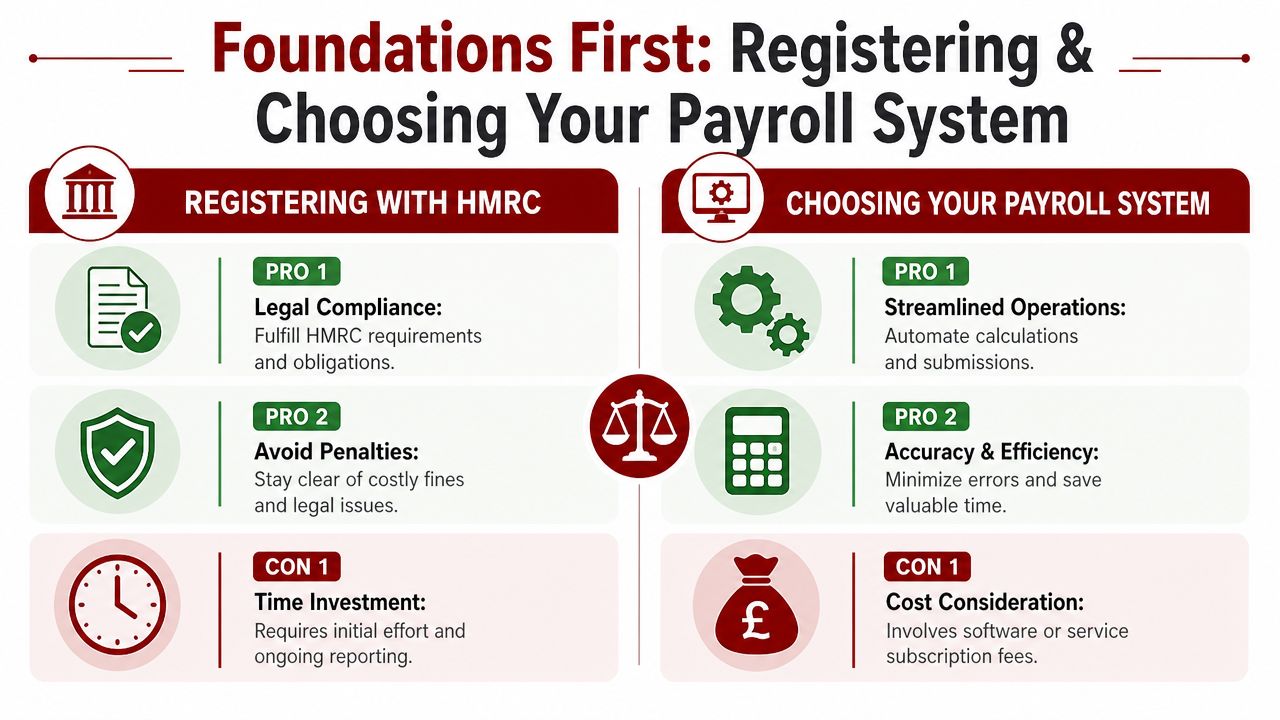
Before you run a payroll, you need to register as an employer with HMRC. That comes first, before payslips, before software comparisons, before your first salary payment.
Register before the first payday
Registration matters because payroll is built around reporting, not just payment. HMRC needs to know you're operating as an employer so that your PAYE scheme is in place and your submissions can be matched correctly.
For a new small business, the sensible order is:
- Register with HMRC as an employer
- Choose payroll software or an outsourced provider
- Collect employee details and starter information
- Set your pay frequency and payroll cut-off date
- Test your first run before the actual payday
If you leave registration too late, you create pressure immediately. Then every later decision gets rushed.
Practical rule: Set your internal payroll deadline earlier than payday. You need time to check figures before money leaves your account.
Free, paid, or outsourced
This is the first serious trade-off. You can run payroll yourself using software, or you can hand it to a payroll provider or accountant. There isn't one right answer for every business.
HMRC's Basic PAYE Tools are the minimum compliant option for some very small employers, particularly those with fewer than ten employees, but the practical limits matter. The tool doesn't give you the broader convenience many owners expect, and the manual work can build quickly. A 2025 Expert Market UK survey found that 68% of microbusinesses using free HMRC payroll tools later spent £150 to £300 annually on add-ons or manual corrections due to filing errors, as noted by Expert Market's guide to payroll solutions for small businesses.
A paid system usually makes more sense when you want cleaner payslips, pension handling, reminders, reporting, and less manual intervention. Outsourcing is often the better choice when your payroll includes variable hours, multiple pay types, directors, or sector-specific issues.
Here's the practical comparison:
| Option | Best for | What works well | What tends to go wrong |
|---|---|---|---|
| HMRC free tool | Very small, simple payrolls | Low upfront cost, basic compliance | Manual steps, weak scalability, limited automation |
| Paid software | Owners willing to run payroll in-house | Better reporting, cleaner workflow, recurring runs | Still needs review and payroll knowledge |
| Outsourced payroll | Busy owners or more complex setups | Less admin, fewer filing worries, specialist support | Ongoing service cost, less direct control |
If you run a tutoring business or any service business with regular sessions and recurring staff payments, a platform with integrated admin can make life easier. Tools such as tutor payroll software show the kind of workflow small teams often need when scheduling and pay records overlap.
What a good system should handle
Don't choose software on headline price alone. Choose it on what it prevents.
A workable payroll system should let you:
- Store staff records securely
- Calculate tax and National Insurance
- Handle pension deductions
- Produce payslips
- Submit FPS and related reports to HMRC
- Keep a clear audit trail
If it can't do those jobs smoothly, you'll end up doing them elsewhere. That usually means spreadsheets, duplicated data, and missed details.
For most owners, the best payroll system isn't the cheapest one. It's the one you'll use properly every month.
The Core Payroll Run From Gross to Net Pay
The monthly payroll run is where theory becomes real. This is the point where you turn agreed pay into an actual net amount in the employee's bank account, while also creating the deductions and employer liabilities that must be reported and paid correctly.
Start with the right inputs
Every clean payroll run starts before the calculation. You need the right source information.
That usually includes:
- Gross pay basis: Salary, hourly wages, overtime, bonus, or commission
- Employee details: Tax code, start information, and payroll ID
- Time data: Approved hours, unpaid leave, statutory leave, or adjustments
- Other deductions: Pensions, student loan deductions, or agreed salary sacrifice arrangements
If the inputs are wrong, the software gives you a fast wrong answer.
For directors, the treatment can be more nuanced than standard employee payroll. If that applies to your business, it's worth understanding the specific National Insurance rules for directors before you process pay.
From gross pay to net pay
The sequence is straightforward once you break it down.
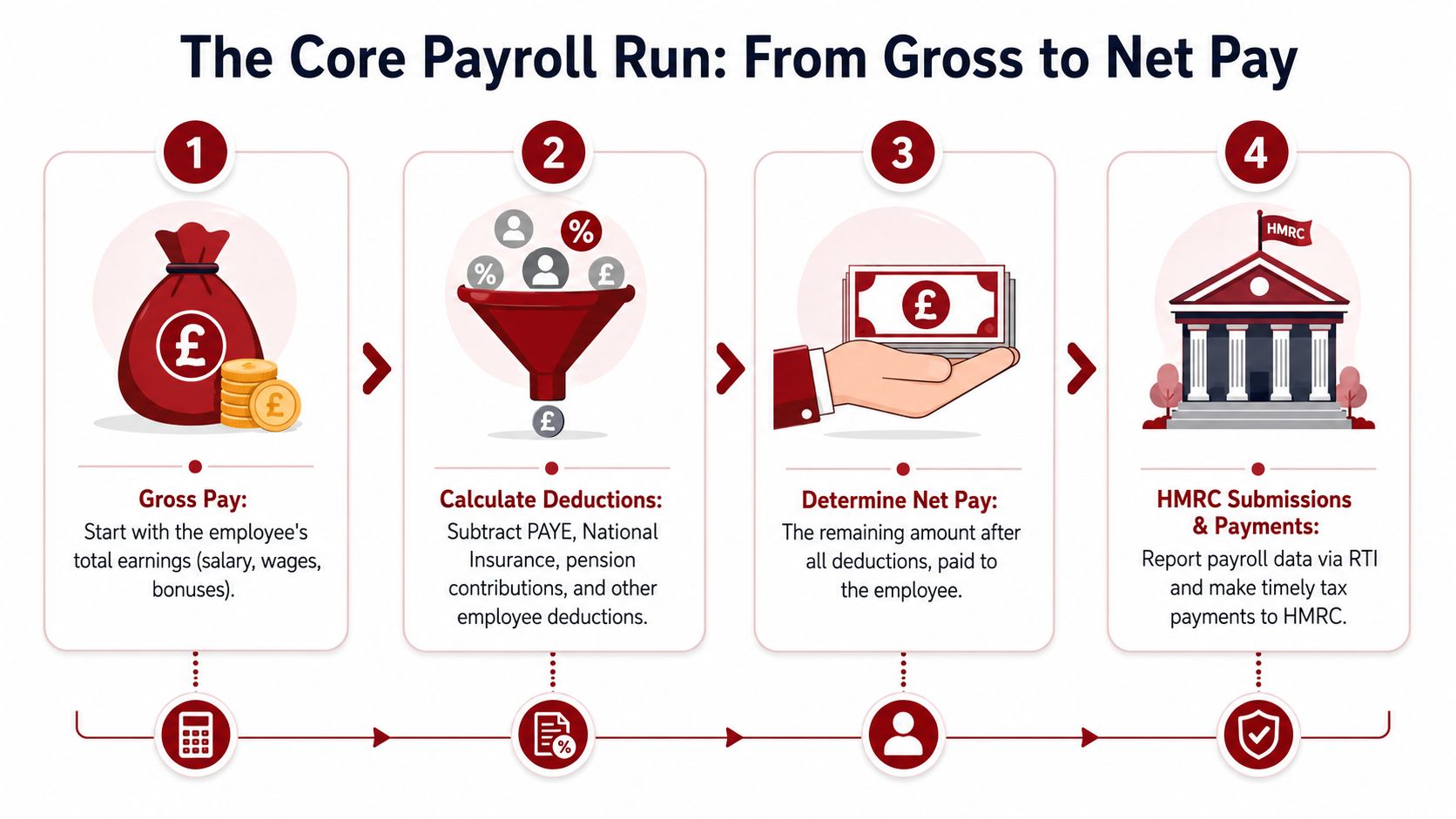
First, calculate gross pay. That's the employee's total earnings before deductions. For a salaried employee, this is usually the agreed monthly salary. For an hourly employee, it's approved hours multiplied by the agreed rate, plus any overtime or extras due.
Then calculate the deductions. In a typical run, these include:
- PAYE income tax, based on the employee's tax code
- Employee National Insurance
- Pension contributions, where applicable
- Any other authorised deductions
After those have been taken off, you arrive at net pay. That's the amount you pay the employee.
Separately, you also calculate what the business owes on top. That can include employer National Insurance and employer pension contributions. These don't reduce the employee's take-home pay, but they do affect your payroll cost and cash flow.
A simple working example looks like this:
| Payroll stage | What to check |
|---|---|
| Gross pay | Has salary, hourly pay, overtime, and any extras been included correctly? |
| Tax calculation | Is the tax code correct and current? |
| NI calculation | Has the software applied the employee status correctly? |
| Pension | Is the employee enrolled correctly and are contributions set up? |
| Net pay | Does the final pay look reasonable against prior periods or agreed terms? |
A short walkthrough often helps if you're setting this up for the first time:
Accuracy matters more than speed
The temptation is to treat payroll as an admin task to finish quickly. That's the wrong instinct. Payroll needs checking, especially if something has changed since the last run.
According to People HR's payroll software overview, 50% of employees start looking for a new job after experiencing just two payroll errors. That makes payroll accuracy a retention issue, not just a compliance issue.
If a payslip looks odd, stop and review it before submitting. Ten extra minutes before payday is far cheaper than correcting a mistake after staff have been paid.
A good discipline is to review payroll in two passes. First, check inputs like hours, rates, and tax treatment. Second, sanity-check outcomes. Has someone's net pay changed sharply? Did an employee who should be in a pension get excluded? Has a leaver remained on the system?
Cash flow also matters here. If your business is waiting on customer payments, delayed income can put pressure on payroll timing. Systems that help you get paid faster for services can support the wider finance process, especially where payroll has to be funded from regular client billing.
The payroll run itself isn't complicated because of one big calculation. It becomes complicated when small unchecked details accumulate.
Pensions and Reporting Your Compliance Duties
Payroll doesn't end at the payslip. Each run has two linked compliance duties attached to it: workplace pensions and HMRC reporting. If either side is handled casually, the whole payroll process becomes unreliable.
Pensions belong inside the payroll routine
Many owners think of pensions as a separate HR task. In practice, pension handling sits inside payroll operations. You assess staff, process deductions, account for employer contributions, and make sure records match what has been paid.
That matters even more when staffing costs are rising. As of late May 2025, 77% of UK businesses with 10 or more employees reported that their staffing costs had increased over the previous three months, including wages, bonuses, National Insurance, and pension contributions, according to the Office for National Statistics. When costs are under pressure, payroll discipline matters more, not less.
The practical point is simple. Pension contributions can't be treated as an afterthought once payroll is ready to submit. They need to be part of the same review.
RTI is the reporting spine of payroll
Real Time Information, usually shortened to RTI, is how HMRC receives payroll data. The core submission is the Full Payment Submission, often called the FPS. That submission needs to reflect what you are paying and when you are paying it.
For a small employer, the working routine is usually:
- Confirm pay data before payroll is finalised
- Run payroll and generate payslips
- Submit the FPS on or before payday
- Pay employees
- Pay HMRC and pension amounts when due
- Store the records properly
A weak process usually breaks at one of two points. Either the numbers are checked too late, or the reporting is left until after payday. Both create avoidable correction work.
Payroll compliance works best when one source of data feeds everything. Staff records, pension settings, payslips, and HMRC reporting should line up inside one process.
A practical monthly rhythm
You don't need a complicated operating manual. You need a rhythm that repeats.
One format that works well is:
| Stage | What happens |
|---|---|
| Before payroll cut-off | Gather hours, salary changes, starter and leaver details |
| Draft run | Review gross pay, deductions, pension status, and exceptions |
| Approval | Confirm the final figures before submission |
| Payday actions | Submit FPS and release payments |
| After payday | File records, note issues, and prepare for HMRC and pension payments |
That approach keeps pensions and RTI connected. It also reduces the common problem where businesses remember the employee payment but overlook the reporting trail behind it.
What doesn't work is splitting payroll ownership between too many ad hoc steps. One person tracks hours, another updates deductions, somebody else submits later, and nobody owns the final check. That's how mismatches creep in.
Payroll for small business is easier to manage when you stop thinking of it as one task on payday and start treating it as a short monthly process with fixed checkpoints.
Specialist Payroll The Construction Industry Scheme CIS
Construction businesses often assume CIS sits alongside payroll as a separate tax issue. That's a mistake. In practice, CIS and payroll affect each other constantly, especially when your business uses a mix of employees and subcontractors.

Why CIS needs its own process
Generic payroll guides often give construction firms false confidence. They explain PAYE, payslips, and RTI, but skip the controls needed when subcontractors are involved.
That gap is expensive. Data cited in Accounts and Legal's guide to payroll in the UK notes that 42% of small construction firms face HMRC penalties due to misaligned payroll and CIS reporting. If you're in construction, specialist handling isn't a nice-to-have. It's basic protection.
Risk usually comes from one of three errors:
- Worker status confusion: treating someone as a subcontractor when they should be on payroll
- Verification failures: paying before the subcontractor position is checked properly
- Late or inconsistent reporting: payroll records say one thing, CIS records say another
What contractors need to get right
If you're a contractor, CIS needs a repeatable admin process. That starts before payment.
The essentials are:
- Verify subcontractors with HMRC before payment where required
- Apply the correct deduction rate
- Keep deduction records and payment statements accurate
- Submit monthly CIS returns on time
- Make sure your payroll and CIS data don't contradict each other
This is where operational systems matter. Construction businesses that already use job costing or estimating tools are usually better placed to keep labour records organised. If you're reviewing your wider setup, Exayard construction estimating software is the kind of tool worth considering because it supports the broader discipline construction firms need around project records and cost visibility.
For registration steps, contractor obligations, and the admin side of the scheme, this guide on how to register for CIS is useful background.
Construction firms get into trouble when the site team, accounts team, and payroll records all describe the same worker differently.
What subcontractors should watch
If you work as a subcontractor, the headline issue is usually cash flow and tax treatment. CIS deductions affect what you receive during the year, so your records need to be complete and your statements need to be kept safely.
Subcontractors should pay close attention to:
- Whether deductions shown match the work billed
- Whether they are being treated as subcontractors consistently
- Whether year-end records support the tax position claimed later
The businesses that handle CIS well don't try to improvise it. They create a dedicated process and keep it aligned with payroll from the start.
Avoiding Penalties A Payroll Compliance Calendar
Most payroll penalties don't start with a dramatic failure. They start with something small that gets missed twice. A late submission. A tax code not updated. A leaver left active. An HMRC payment date that passed while everyone was busy elsewhere.
The mistakes that cause most payroll stress
The same problems appear again and again in small businesses. They're rarely complicated. They're usually process failures.
Here are the big ones.
- Wrong employee setup: Starter details, tax codes, or pay rates are entered incorrectly at the beginning, and the error repeats every cycle.
- Late payroll approval: Hours or changes come in too close to payday, so nobody has time to review the figures properly.
- Missed HMRC submissions: The pay run is completed, but the reporting step is delayed or forgotten.
- Poor record storage: Payslips, starter details, pension communications, and payroll reports are scattered across inboxes and downloads.
- No calendar ownership: Everyone assumes someone else is watching the deadlines.
A practical way to reduce these errors is to assign one internal owner for payroll readiness, even if payroll processing itself is outsourced. Someone still needs to confirm hours, joiners, leavers, and pay changes before the run starts.
A simple payroll calendar that works
The best payroll calendar is the one your business will follow. It doesn't need to be complicated. It needs to be visible and tied to your pay date.
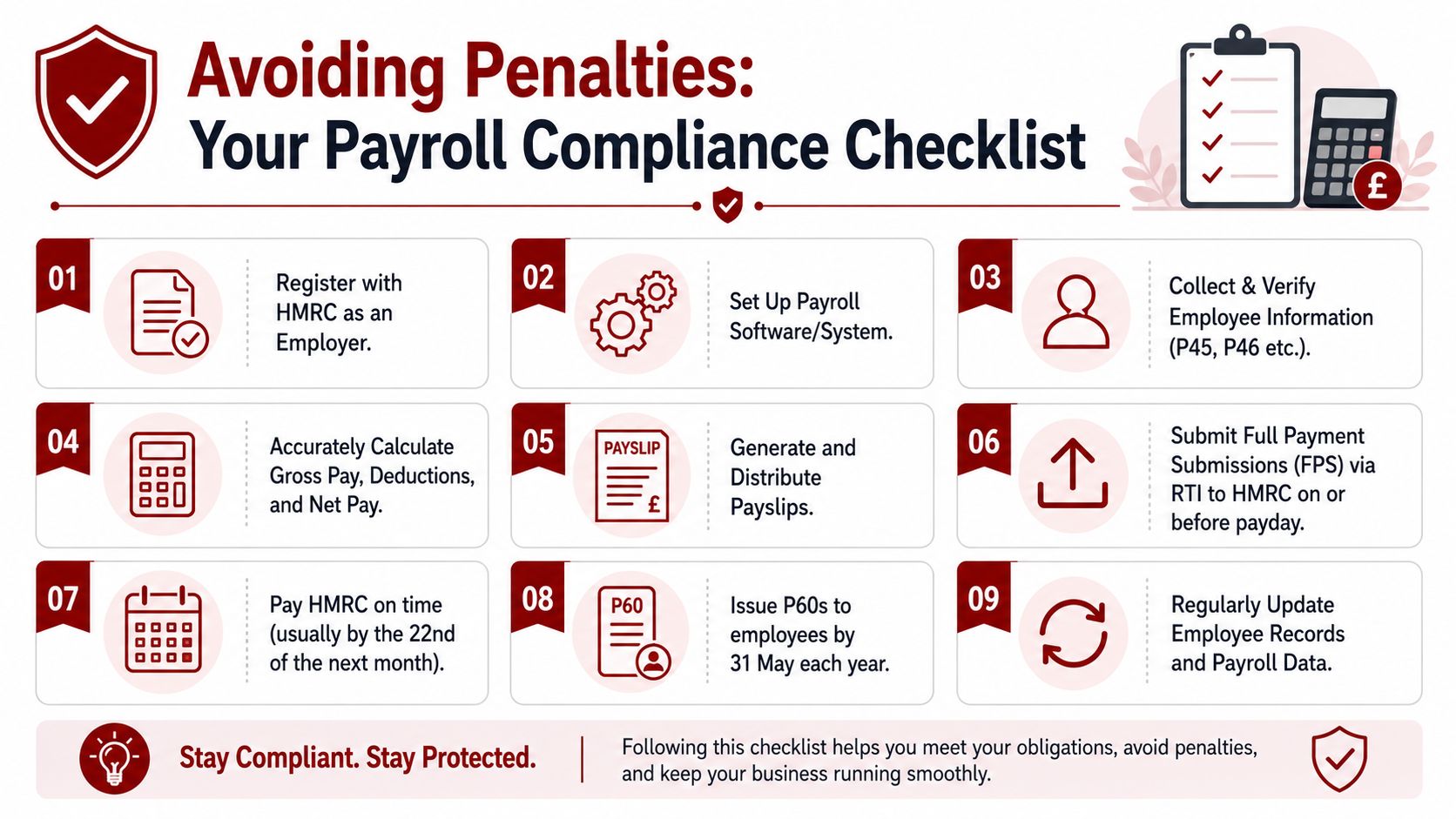
A sensible recurring monthly checklist looks like this:
| Timing | Action |
|---|---|
| Before the payroll cut-off | Confirm all hours, overtime, starters, leavers, and changes to pay |
| Payroll review day | Check draft payslips, deductions, pension treatment, and exceptions |
| On or before payday | Submit the FPS to HMRC and release employee payments |
| After payday | File reports and confirm liabilities due to HMRC and pension provider |
| Monthly follow-up | Reconcile payroll totals to your accounting records |
For annual compliance, keep these fixed points in your diary:
- P60s by 31 May: Employees need their year-end summary on time.
- Annual payroll review: Check that employee records, tax treatment, pension setup, and software settings still reflect the business as it operates.
- Director and owner review: If pay structures have changed, revisit the payroll treatment rather than assuming last year's setup still works.
If you're also balancing owner tax obligations alongside payroll deadlines, keeping an eye on the wider self assessment deadline in the UK helps avoid the common mistake of treating payroll and personal tax as unrelated admin.
A compliance calendar only works if it includes internal cut-off dates, not just HMRC deadlines.
Records that protect you later
Good records don't feel urgent until a problem appears. Then they become the difference between a quick correction and a long argument.
Keep these items together in one reliable system:
- Employee starter information and status records
- Approved pay data and timesheets
- Payslips and payroll reports
- FPS confirmations and related HMRC records
- Pension records and communications
- Leaver details and final pay calculations
What works well is one payroll folder structure and one repeatable review routine. What doesn't work is relying on email searches and memory.
For most small employers, payroll becomes manageable when the business stops treating it as a monthly interruption and starts treating it as an operating system. Once the calendar is in place, the stress level usually drops quickly.
If you'd rather have payroll handled accurately, on time, and with proper attention to PAYE, pensions, and CIS where relevant, Action Accountants Limited can help you set up a practical process and keep it running smoothly as your business grows.