

CIS Deduction Calculator Guide for UK Contractors
Action Accountants •1 August 2026
You've sent off the invoice, then the payment email lands back with a CIS deduction query, and suddenly the numbers don't line up with what you expected in your bank account. That's the moment a cis deduction calculator stops being a convenience and becomes a control point, because the answer has to match HMRC rules, subcontractor status, materials, and VAT treatment, not just a headline percentage. Get any one of those wrong and the subcontractor gets underpaid, the contractor carries the error, and the monthly CIS return turns into a repair job instead of a routine filing.
Table of Contents
- Why a CIS Deduction Calculator Matters on Every Invoice
- Verifying Subcontractor Status Before You Calculate
- Running the CIS Deduction Formula Step by Step
- Handling Materials, VAT, and Gross Payment Edge Cases
- From Net Payment to the HMRC Remittance Deadline
- Common Calculator Mistakes That Cost Contractors Money
- Recordkeeping, Returns, and When to Bring in a Specialist
Why a CIS Deduction Calculator Matters on Every Invoice
A contractor cannot treat CIS as a quick percentage on the invoice total and stop there. The calculation only works if the starting point is right, the subcontractor's status has been checked, VAT has been separated where it applies, qualifying materials and direct costs have been removed, and the correct 20%, 30%, or 0% rate is applied to the right figure. The question is not “what is the rate”, it is “what amount is the rate being taken from”.
That matters on a live job because two invoices that look almost identical can produce very different net payments. One subcontractor may be registered, one may be unregistered, and one may have gross payment status, so the cash leaving the business changes in each case. A calculator that ignores those differences gives a neat answer, but not one you can defend if the figures are checked later.
A proper CIS deduction calculator works as part of the invoice workflow, not as a standalone percentage box. It should help you verify status, split out materials, keep VAT in the right place, and leave a clear trail for the monthly return and payment to HMRC. Contractors who want to compare contractor invoice software should check whether CIS handling is built in, because the software has to do more than print a polished invoice. The same point applies to cash flow management, because CIS affects both what you pay out now and what you still owe later.
Practical rule: if the calculator does not force you to separate labour from materials, it is not doing the full CIS job.
A simple worked sequence is usually the safest way to use it. Check the subcontractor's status, enter the invoice lines, remove any qualifying materials, apply the right deduction rate, and then record what the subcontractor receives. That is the figure that matters in practice. It tells the contractor how much leaves the bank account today and what remains to be remitted on the HMRC side, while the paperwork shows exactly how the payment was built.
Verifying Subcontractor Status Before You Calculate
A CIS deduction starts with one question. What status was in force when you paid the subcontractor? If that is wrong, the calculator will still produce a figure, but it will not match the amount you were allowed to deduct.
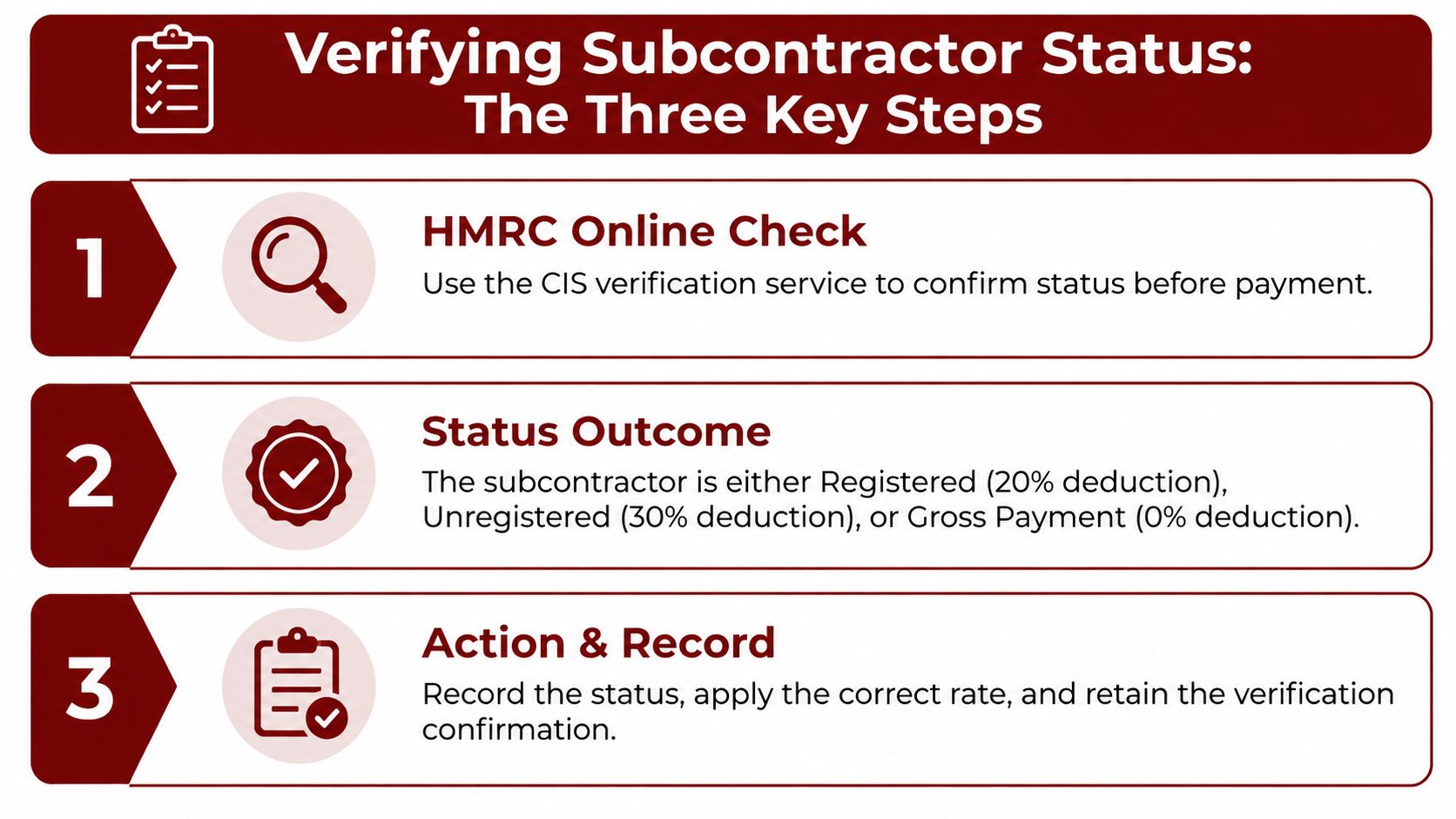
There are three outcomes that matter here, registered, unregistered, or gross payment status. Each one changes the rate, and each one changes what the subcontractor receives after the invoice is processed.
Check the status first, then feed the calculator
Use HMRC's verification service before you release payment, then save the result with the invoice. That check tells you whether the subcontractor is on the system, whether the details match, and whether you can rely on the rate you are about to use. If the record does not match, do not guess at the lower deduction, because the calculator is only as good as the status you put into it.
The rate follows the verified status. Registered subcontractors are deducted at 20%, unregistered subcontractors at 30%, and gross payment status means no CIS deduction is taken from the payment amount. If the subcontractor's position changes during a job, the rate has to change with it, and the earlier rate should not be carried forward just because it was used on the last invoice.
Record the verification, not just the result
A calculator output alone will not protect you if the payment is reviewed later. Keep the verification confirmation, the date you checked it, and the rate applied so the deduction can be tied back to one clear decision. That paper trail matters as much as the number on the screen.
If you are explaining the process from the subcontractor side, how to register for CIS is a useful starting point. It helps explain why a subcontractor may move from one status to another and why a contractor needs to check before every payment cycle.
The rate follows the status, not the other way round.
That is the part contractors often miss. The calculator applies the decision you have already justified, it does not justify the decision for you. Without the verification record, the figures can still be challenged even when the arithmetic looks right.
Running the CIS Deduction Formula Step by Step
A CIS calculator only works properly when the payment has been broken into the right parts first. Start with the gross invoice, remove VAT where it is shown separately, take off any allowable materials or direct costs, then apply the CIS rate to the remaining labour base. The subcontractor's net payment is the figure left after that deduction. That sequence matters because the calculator is working from the payment structure, not just from a headline percentage.
Work the invoice from top to bottom
Use a £10,000 gross invoice with £2,000 of eligible materials and a verified 20% rate as the benchmark. The taxable base becomes £8,000, because the materials are excluded from the deduction base, and 20% of that is £1,600. The subcontractor's net payment is therefore £8,400 before any other tax treatment.
That example is useful because it shows where the calculator can go wrong in practice. If the answer does not match that structure, the problem is usually the base figure, the materials split, or the rounding method, not the CIS rate itself.
The same invoice under the 30% rate
Change only the verification outcome, and the cash result shifts immediately. On the same £8,000 taxable base, a 30% deduction gives £2,400, leaving £7,600 net to the subcontractor. The labour content has not changed. The contractor has moved from one deduction rate to another because the status check came back differently.
Key takeaway: CIS is applied to the labour base, so the same invoice can produce very different cash outcomes depending on status.
That is why the calculator has to sit inside the wider payment workflow. A contractor who keys in the gross figure and removes 20% from the total is doing a quick arithmetic shortcut, but not the CIS calculation the payment needs.
Handling Materials, VAT, and Gross Payment Edge Cases
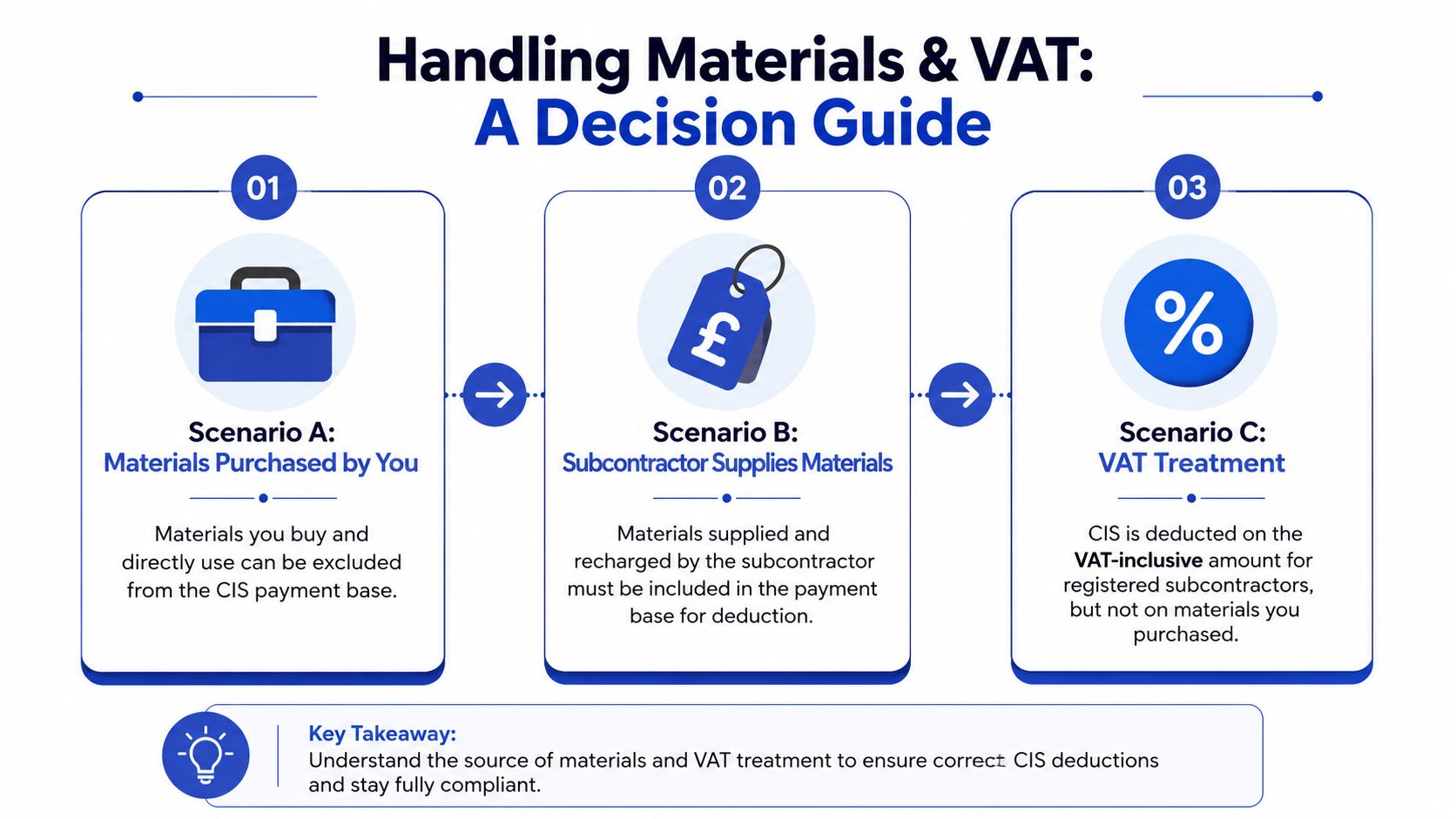
A contractor can get the CIS number right and still pay the wrong net amount if the invoice mixes labour, materials, and VAT in a way the calculator cannot read on its own. Materials usually create the argument, because they sit between a true job cost and a recharged item on the invoice. Qualifying materials and direct costs come out of the deduction base, including direct materials, plant hire, consumable stores, fuel used for the job, and manufacturing or prefabrication materials when they properly belong in that category. The calculator still depends on how the invoice is split, so vague wording on the bill can push the result off course.
Split the invoice the way the work was actually done
A mixed invoice needs to be entered as the work was carried out, even if your software only shows one total. Labour stays in the CIS base, allowed materials come out, and plant hire only stays out if it qualifies as a direct job cost. That distinction matters because subcontractor-supplied materials that are recharged on the invoice are not treated the same way as materials bought and used directly on site.
VAT changes the entry point before the deduction is even calculated. Where VAT is shown separately, the CIS base comes from the taxable amount after VAT is stripped out, and the position becomes more sensitive where construction services fall under reverse charge VAT explained. The calculator has to work from the right net figure first, because VAT treatment can change what you feed into it even when the labour content has not changed.
Gross payment status changes the deduction, not the compliance trail
Gross payment status removes the deduction entirely, so the calculator should show the full amount payable to the subcontractor. The status check still has to be done and kept on file, because no deduction only makes sense if the contractor can show why it was not taken. The invoice, the verification note, and the support behind the decision still need to line up.
A good payment workflow also has to handle the no-deduction case without losing the audit trail. If the subcontractor has gross payment status, the calculator is not just returning a bigger payment figure, it is recording why CIS did not reduce that figure at all. That matters on live jobs where one supplier is verified at standard deduction, another is on gross payment, and the payment run has to treat them differently without guessing.
The same applies to mixed invoices that include materials and labour. The calculator only works properly if the person entering the figures has already decided what belongs in the CIS base and what stays outside it. A clean invoice split is doing part of the accounting before the calculator does the rest.
From Net Payment to the HMRC Remittance Deadline
Once the deduction is taken, the job isn't finished. The contractor has to carry that withheld amount through to HMRC on time, and the timing matters because CIS deductions must be paid by the 22nd of the following tax month if paying electronically, or the 19th if paying by cheque (Trade Tax Specialists CIS deduction calculator). That timing links the calculator directly to the payment cycle, not just the invoice date.
One deduction, three ledgers
Take the earlier £1,600 deduction example. The subcontractor receives £8,400 net, the contractor records £1,600 as the CIS liability, and that amount has to be matched to the monthly CIS return workflow. The contractor isn't just paying a supplier, they're holding money that must be remitted to HMRC on the right deadline.
| Step | Typical Timing | Action |
|---|---|---|
| Deduction taken from subcontractor payment | On payment date | Apply the verified CIS rate to the correct taxable base |
| CIS amount set aside for HMRC | Immediately after payment | Hold the deducted sum as a liability, not as spendable cash |
| CIS remittance due | By the 22nd of the following tax month, or 19th by cheque | Pay HMRC the withheld amount |
| CIS return prepared | Within the monthly cycle | Reconcile payments, deductions, and supporting records |
| CIS300 filed | By the monthly deadline | Submit the return with the figures actually declared |
That table is where a calculator becomes a workflow tool. It shows the bridge between the payment to the subcontractor and the money the contractor still owes HMRC, and that bridge is where most late-payment mistakes start.
The monthly return, often referred to as the CIS300, has to reconcile what was paid, what was withheld, and what was reported. If payroll, accounts payable, and the CIS return are being handled in separate passes, the risk is simple: the deduction gets entered one place, missed in another, and the figures no longer agree.
Practical rule: the calculator output should be checked against the amount actually declared before month-end, not after HMRC has already received the return.
A contractor who treats CIS as a closing process, not a live payment process, tends to stay ahead of errors. The one who waits until month-end usually finds that the numbers no longer fit neatly together.
Common Calculator Mistakes That Cost Contractors Money
Most CIS mistakes aren't caused by bad intent, they come from using the calculator too casually. The formula can be correct on paper and still produce the wrong answer if the invoice is entered badly, the status is stale, or the wrong part of the bill is treated as labour. That's why the same issue keeps reappearing across contractor accounts.
The traps are usually mechanical, not mathematical
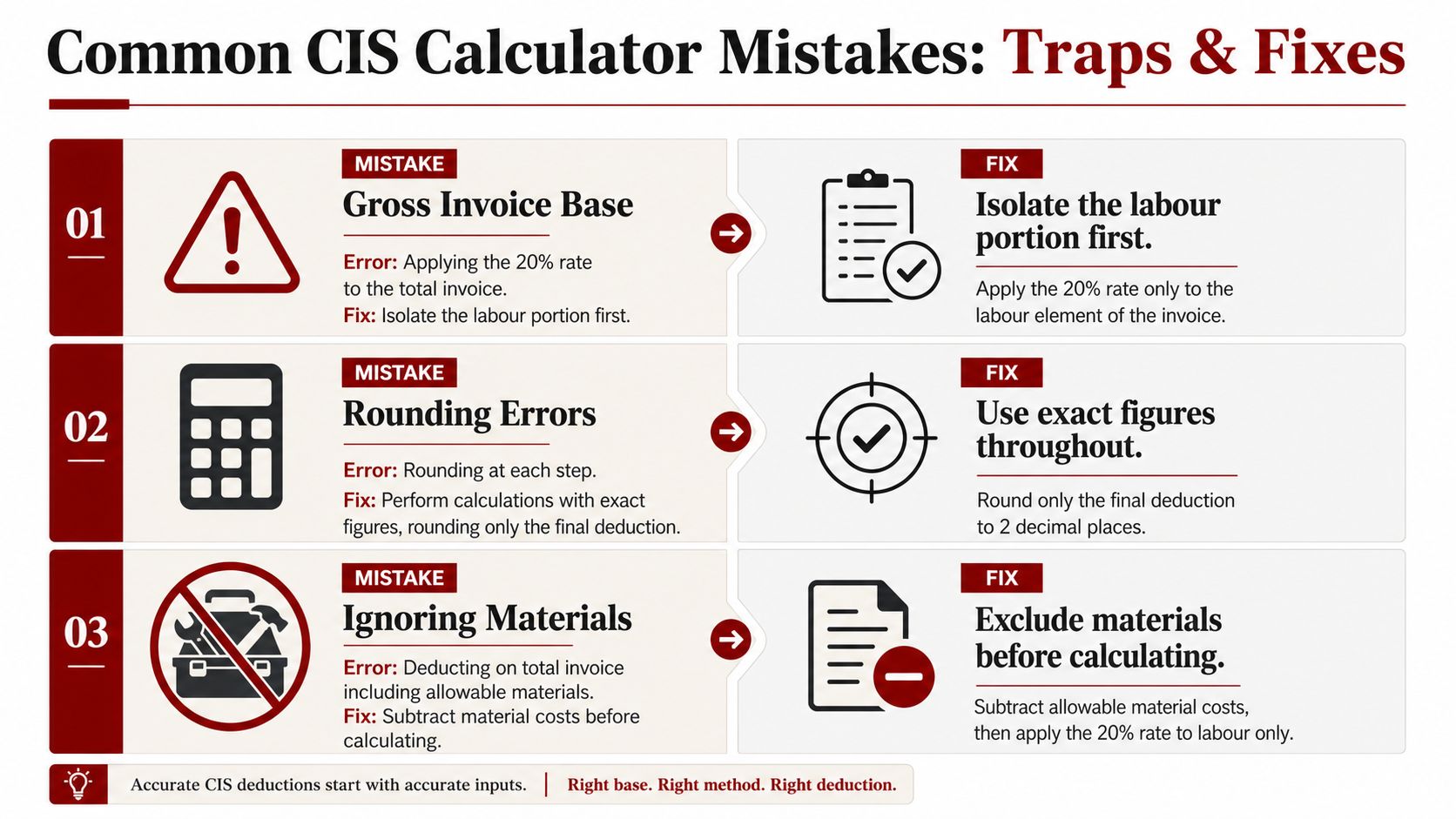
- Gross invoice base: The symptom is an over-deduction that makes the subcontractor complain immediately. The root cause is applying the rate to the full invoice instead of the labour base. The fix is to isolate labour first and only then calculate the deduction.
- Rounding errors: The symptom is small differences that build across multiple payments. The root cause is rounding each line too early. The fix is to keep exact figures through the calculation and round only the final deduction.
- Ignoring materials: The symptom is a deduction that feels too high compared with the work done. The root cause is failing to remove qualifying materials before applying the rate. The fix is to separate the materials cost and confirm it is allowable.
- Unverified status: The symptom is a rate that later turns out to be wrong. The root cause is paying before checking HMRC status. The fix is to verify first, pay second.
- Mid-project changes: The symptom is a repeat payment at the old rate even after circumstances changed. The root cause is assuming a previous verification stays valid for every later invoice. The fix is to re-check status when anything about the subcontractor's position changes.
Treat the calculator as the last step, not the first
The fastest way to get a clean CIS result is to make the invoice structure and the status check correct before the calculator is touched. That's why software and manual spreadsheets both fail in the same place when the user rushes the setup. The maths is usually fine, the inputs are not.
The video below is useful if you want to see the process framed visually as a working routine rather than a one-off calculation.
Recordkeeping, Returns, and When to Bring in a Specialist
A CIS deduction calculator gives you the figure. It does not finish the job. The contractor still has to keep the gross invoice, the net payment, the verification record, and the materials evidence in a form that matches the monthly CIS return. If HMRC asks questions later, the file needs to explain the deduction from paperwork, not from memory. Keep those records organised from the first invoice, because the practical test is whether you can rebuild the calculation cleanly months later.
Keep the proof behind the number
The invoice, the status check, the materials evidence, and the payment record all need to line up. If they do, the calculation is easy to defend. If one item is missing, the deduction can still be right, but the support for it becomes weak.
A good filing habit also makes a manual check faster when the numbers do not look right. The calculator output should match the declared figures, the materials should be backed by invoices or delivery notes, and the payment record should show what the subcontractor received. That is the point where the paperwork matters more than the software.
For a wider view of bookkeeping and tax support for builders, top contractor accounting tools in the UK is useful context, especially if you want to compare what software can handle and what still needs a person to check. For contractors who want the accounting side explained in a construction setting, accounting for contractors in construction gives that broader framework.
Know when the calculator is no longer enough
A specialist earns their keep once the job stops being a simple one-invoice check. That can happen when several subcontractors are on different rates, when VAT treatment changes from one invoice to the next, when gross payment status is in play, or when a mistake would affect cash flow hard enough to throw off the whole month. The calculator can still produce a number, but it will not manage the ledger, the return, or the remittance cycle for you.

The actual value is control over the full workflow. Verify the subcontractor first, check the materials before the deduction is run, then tie the result back to the monthly HMRC remittance deadline so the return and the payment match. That is how CIS stays manageable. If the paperwork, payment timing, and return are drifting apart, the calculator is only hiding the problem.
If you want CIS deductions handled cleanly from invoice to monthly return, Action Accountants Limited can help with bookkeeping, contractor compliance, and practical tax support that fits the way construction businesses work. Visit Action Accountants Limited to speak with a team that understands CIS cash flow, deduction checks, and the records you need to keep everything aligned.