


You've agreed a start date with your first employee, chosen a monthly payday, and set aside enough money for the wages. It's tempting to treat payroll as a quick calculation followed by a bank transfer. That approach is how founders miss reporting obligations, underestimate employer costs, or discover too late that their software can't handle a required deduction.
Knowing how to set up payroll properly means designing a process that works before, during, and after every payday. The right setup connects employee records, PAYE, National Insurance, pensions, benefits, cash flow, and accounting records. It also gives you a clear owner for each task, so a deadline doesn't depend on someone remembering it between sales calls.
Table of Contents
- Why Payroll Is a Compliance Project, Not Just Admin
- Registering as an Employer With HMRC
- Choosing Between DIY Software and Outsourced Providers
- Collecting Employee Data and Calculating Pay
- Submitting RTI Returns and Managing Pensions
- Preparing for Mandatory Benefits and Ongoing Compliance
Why Payroll Is a Compliance Project, Not Just Admin
A founder can press “approve” in payroll software and send money to an employee's bank account, but that action triggers more than a wage payment. It creates tax withholdings, employer liabilities, accounting entries, payslip information, and reporting responsibilities. Treating payroll as a payment routine leaves too much room for an incorrect tax code, incomplete employee record, or missed submission.

The UK moved to a live reporting model in April 2013, when HMRC required employers to send PAYE information electronically through Real Time Information payroll software whenever they paid employees. The employer must submit a Full Payment Submission, or FPS, on or before each pay date, with HMRC describing the information as transmitted every time an employee is paid. You can review the practical background in this payroll tax guide from Allied Tax, particularly if you're building your first payroll checklist.
That change matters before the first payroll run. Your system needs to be RTI-compatible, and it needs accurate employee information, including:
- Identity details: Name, date of birth, gender, and address.
- Tax identifiers: National Insurance number and the employee's tax information.
- Pay details: Salary or hourly rate, pay frequency, start date, and agreed deductions.
- Employment information: Worker status, pension assessment data, and any relevant statutory payment details.
Practical rule: Don't make the first payday your system test. Run a controlled review of employee records, pay settings, deductions, and reporting settings before wages are due.
The administrative burden also grows beyond payroll calculation. Founders often need help coordinating payroll with bookkeeping, tax planning, company secretarial work, and cash-flow forecasting. Guidance on how an accountant can help your small business can help you decide which responsibilities should stay internal and which need professional oversight.
Registering as an Employer With HMRC
You need to register as an employer with HMRC before running payroll for staff. Registration creates the PAYE scheme through which you report employee pay and deductions, and it gives your business the employer references needed for payroll administration.
The timing is more nuanced than many startup checklists suggest. HMRC says a first-time employer should register once there's a confirmed start date, and the employer can register up to two months before paying staff. That means incorporation alone doesn't necessarily justify opening a PAYE scheme immediately. If you register before hiring plans are firm, you may create return and record-keeping tasks before the business has a live payroll.
A sensible registration sequence
Start by confirming the employment details:
- Agree the start date. Make sure the contract and expected first pay date are clear.
- Decide the pay frequency. This affects your payroll calendar and the timing of RTI submissions.
- Register with HMRC. Use the employer registration process and provide the business and responsible-person information requested.
- Secure the PAYE references. Keep the employer reference and accounts office reference with your payroll records.
- Configure your software. Enter the PAYE scheme details exactly as HMRC provides them.
- Set an internal deadline. Work backwards from payday so payroll review, approval, payment, and submission are all assigned.
You'll also need to establish whether the business has additional obligations connected with its workforce. Pension duties, statutory payments, benefits, and sector-specific deductions shouldn't be left until after registration because they influence the software and workflow you choose.
For founders still completing formation tasks, it's useful to keep payroll registration aligned with wider new business registration requirements. The objective isn't to delay preparation. It's to prepare the data, budget, and process first, then register when a real employment start date makes the PAYE scheme necessary.
The 2026/27 employer National Insurance changes make this decision more important for cash planning. Registration itself doesn't solve the cost question, so calculate the likely employer liability before committing to a payroll start date or assuming that a proposed hire will fit comfortably within the budget.
Choosing Between DIY Software and Outsourced Providers
Payroll software and outsourced payroll solve different problems. Software gives you direct control over the process, while outsourcing transfers much of the operational workload and deadline management to a provider. Neither option removes your responsibility to provide accurate information and approve the results.
A small company with straightforward salaries, stable pay dates, and an organised administrator may manage well with Sage, Xero Payroll, or another compatible platform. A construction business dealing with CIS, variable hours, subcontractors, expenses, and changing worker classifications may need more configuration and review than a basic setup suggests.
| Feature | DIY Software | Outsourced Provider |
|---|---|---|
| Control | You enter, review, and approve payroll directly | You provide data and approve the provider's calculations |
| Cost structure | Software subscription and internal staff time | Service fees, usually reflecting payroll volume and complexity |
| Compliance support | Depends on software alerts, updates, and your knowledge | Provider manages agreed calculations, filings, and calendar tasks |
| Flexibility | Quick access to records and on-demand changes | Changes follow the provider's cut-off and approval process |
| Sector complexity | Works when configured correctly, but needs internal expertise | More suitable when CIS, statutory payments, or unusual deductions need specialist handling |
| Scalability | Can become a bottleneck as employees and pay types increase | Can absorb administration, subject to service capacity and controls |
What DIY does well
Self-service payroll is practical when one person owns the process and understands the consequences of each input. It can provide immediate visibility of gross pay, deductions, employer costs, and accounting postings. The weakness is rarely the software's ability to calculate. It's usually the business's failure to update employee data, review exceptions, or submit the right return after a change.
What outsourcing does better
A managed provider can create a calendar, process payroll from approved inputs, and support statutory payment and reporting workflows. Before appointing one, ask who reviews the payroll, who submits RTI, how corrections are handled, what information must arrive by the cut-off, and whether the service covers pension administration and benefits reporting. A useful explanation of the allocation of responsibilities appears in this managed payroll guide from Paradigm International Inc..
For London startups, the best choice often depends on operational discipline rather than headcount. If payroll competes with client work and no trained person can cover holidays or absences, outsourcing may reduce execution risk. If you keep the process in-house, document it and connect it to your accounting system. Businesses comparing external support can review payroll and bookkeeping services as one available model.
Collecting Employee Data and Calculating Pay
Payroll accuracy starts with the employee record, not the calculation screen. Collect the information before the first pay run and keep a controlled record of who supplied it, when it changed, and who approved the change.
Ask each employee for the information relevant to their circumstances. That normally includes a P45 where available, starter information where it isn't, National Insurance details, address, date of birth, bank details if using electronic payment, pay rate, contracted hours, and any approved deductions. You also need the information required to assess workplace pension duties and record the employee's declaration or response where applicable.
Build the calculation around gross pay
The calculation should follow a repeatable sequence:
- Confirm earnings: Enter salary, hours, overtime, commission, bonuses, or statutory pay for the period.
- Check inputs: Compare hours and pay against the approved timesheet, contract, or payroll instruction.
- Apply employee deductions: Calculate PAYE tax, employee National Insurance, pension deductions, and authorised post-tax or pre-tax deductions according to the applicable rules.
- Calculate net pay: The remaining amount is what you pay to the employee.
- Record employer costs: Add employer National Insurance, pension contributions, and other employer liabilities to the payroll cost.
- Review exceptions: Investigate unusually high or low net pay, new tax codes, missing National Insurance numbers, and changes in deductions before approval.
The 2026/27 employer National Insurance position creates a cash-flow issue that deserves its own line in your forecast. The secondary threshold is £5,000 and the employer National Insurance rate is 15% under the employer guidance for that tax year, while the Employment Allowance is £10,500. These figures appear in HMRC's 2026 to 2027 employer guide to PAYE and National Insurance Contributions.
Don't assume the allowance solves the problem
Employment Allowance can reduce eligible employer National Insurance, but you must establish whether the company qualifies and how the allowance applies to its workforce. A founder should model the employer cost before hiring, rather than placing the full salary in the budget and treating National Insurance as a minor adjustment. The result may influence whether the business hires an employee, engages a self-employed contractor, or changes the timing of recruitment. Worker status must reflect the actual working arrangement, not the lower-cost option.
A final review should compare the payroll register with the bank payment file and accounting entries. One wrong digit in hours, salary, or a deduction can produce three separate problems, an incorrect employee payment, an inaccurate liability, and a reconciliation difference.
Submitting RTI Returns and Managing Pensions
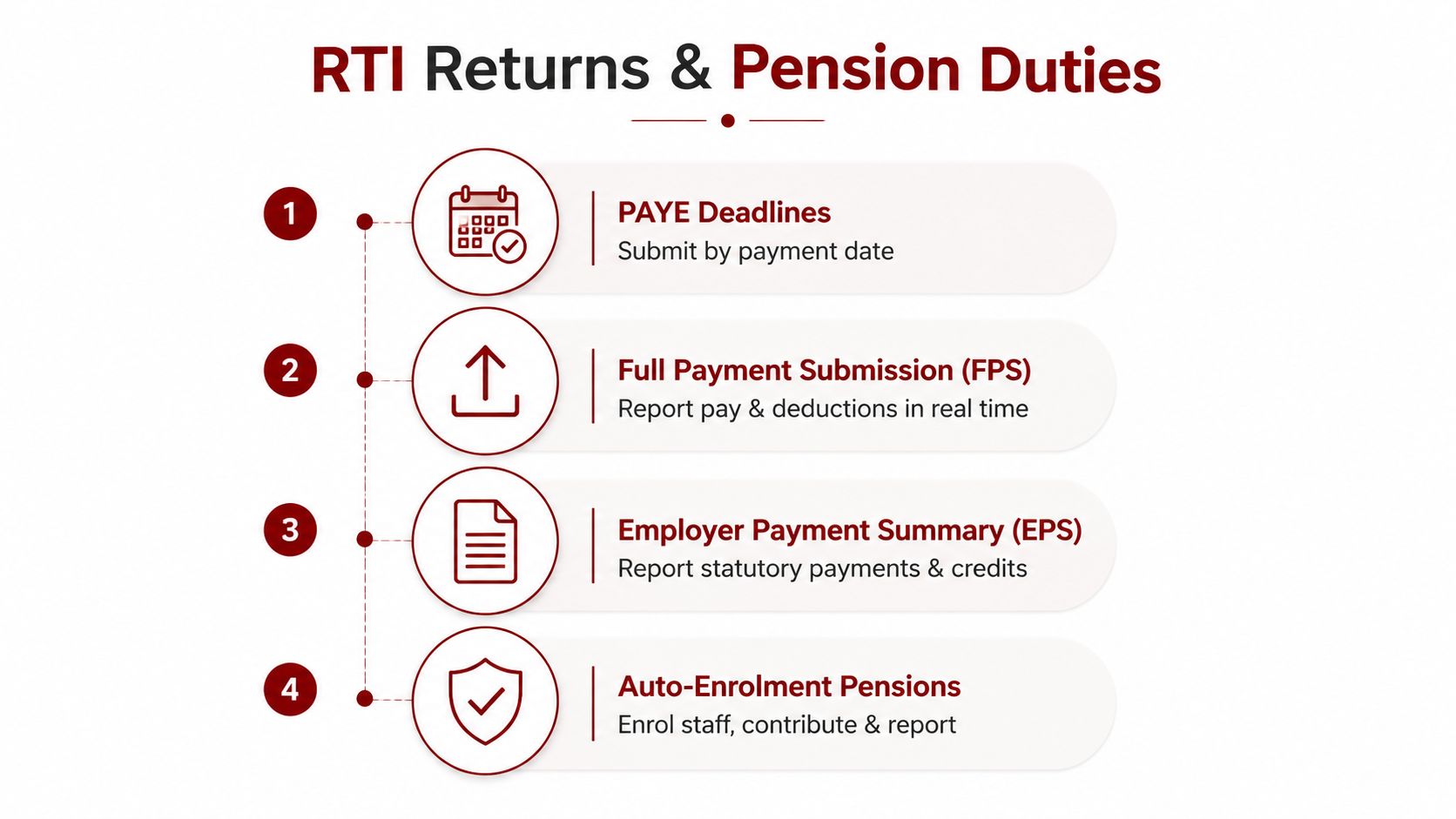
Payroll remains unfinished until the business reports the payment and deals with its pension responsibilities. The core RTI process requires an FPS on or before the date employees are paid, so your payroll calendar should be built around the pay date rather than the day someone happens to open the software.
Use a controlled payroll calendar
A practical calendar separates preparation from submission:
- Before payday: Gather approved hours, changes, starters, leavers, statutory pay details, and pension information.
- During the payroll run: Calculate gross pay, deductions, employer costs, and net pay. Review variances before approval.
- On or before payday: Submit the FPS and release employee payments according to the agreed banking process.
- After processing: Reconcile the payroll journal, PAYE liability, pension deductions, employer contributions, and bank movement.
- When relevant: Submit an Employer Payment Summary, or EPS, for statutory payments, adjustments, or credits supported by the payroll record.
The FPS reports the pay and deductions for the employees included in that payroll. If you make a correction, stop paying an employee, or need to report a change, use the process supported by your payroll software and HMRC guidance rather than overwriting the original record informally.
Payroll should have two people involved where possible. One prepares the inputs, and another checks the payroll register, payment total, and submission status.
Auto-enrolment adds a second compliance track. Employers were brought into workplace pension duties in stages, and employers that existed in April 2012 were required to meet their enrolment duties by February 2018, as recorded in the government publication on workplace pension participation and saving trends (workplace pension participation and saving trends). New employers must determine their own duties and dates rather than relying on that historical timetable.
You'll need a qualifying pension arrangement, employee assessment information, contribution settings, opt-in or opt-out records, and a process for keeping the pension provider's data aligned with payroll. For a practical review of the employer obligations, see the auto-enrolment pension rules.
Preparing for Mandatory Benefits and Ongoing Compliance
Benefits payroll now needs to be treated as a core part of the setup process. From 6 April 2027, payrolling benefits in kind will become mandatory in a phased rollout, so employers should plan ahead. Employers that wanted to formally payroll benefits for 2026/27 had to register with HMRC by 5 April 2026, according to HMRC's employment tax reporting guidance.
The change affects businesses providing company cars, private medical cover, and other taxable benefits. List every benefit the business offers, identify its taxable value, maintain accurate employee records, and confirm that the payroll system can report each item correctly. During the relevant phase, the business may also need to decide whether payrolling benefits or continuing with P11D processes is more practical.
Prepare the benefits record before the tax year
Build the benefits register before the first reporting deadline. It should record:
- Benefit type: For example, a company car or medical insurance.
- Recipient: The employee receiving or using the benefit.
- Availability dates: When the benefit started, changed, or ended.
- Payroll treatment: Whether the item is included through payroll or handled through the relevant alternative reporting process.
- Supporting evidence: Provider invoices, agreements, valuation details, and approval records.
The register should feed payroll and accounting, with a named person responsible for reviewing it. Software can apply configured rules, but it cannot know that an employee changed vehicles, added family cover, or stopped receiving a benefit unless the business updates the records.
Ongoing compliance needs a scheduled control routine. Review National Insurance settings and software updates at each tax-year change. Check pension contributions against the provider output, reconcile PAYE with payroll journals, and keep starter and leaver records current. Employees should report changes promptly, especially changes to bank details, addresses, tax information, or benefits.
Automation can reduce repetitive data entry and help manage rising operating costs, but it does not replace control. It works only when approvals are clear, source data is reliable, and someone investigates exceptions instead of accepting the software output without review.
For a new UK business, document the complete payroll operating procedure. Set out who collects data, approves changes, runs payroll, submits RTI, pays liabilities, checks pensions, and reviews benefits. This creates a controlled process that can expand as the company hires, while reducing the risk of missed reporting, incorrect deductions, or unexpected cash-flow pressure.
Action Accountants Limited can help new and growing businesses set up and administer PAYE payroll, coordinate National Insurance, statutory payments, pensions, and year-end payroll forms, while keeping wages and payroll liabilities aligned with the accounts. Visit Action Accountants Limited to discuss a payroll process suited to your business, sector, and hiring plans.